
Position Filter
The panel on the right side of the page has two modes, chosen with the Selection and Info tabs at its top.
- Selection scopes the active view. It selects any subset or all positions across multiple accounts, and the report, table, or chart reflects that selection.
- Info inspects one position. Clicking a position opens a panel of its full detail.
The panel is opened with the Filter button in the component toolbar, and closed with the x beside the tabs.
The panel is available on:
- Underlying Exposure
- Account Exposure
- Position Exposure
- Expiry Exposure
- Expiry Profile
- Delta Profile
- Vol Scenario
- Vol Sweep
- Reports
- Tables
Position list
Section titled “Position list”Both modes share the same list. Positions are grouped by underlying, with a checkbox on the underlying and on each position beneath it. Checking an underlying takes every position in it.
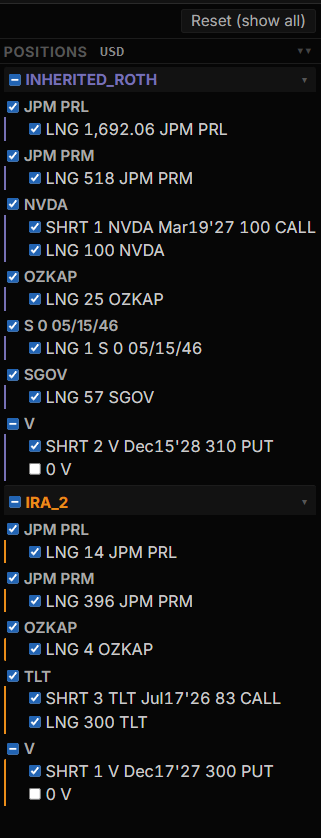
Each row names the contract, prefixed by its side and quantity: LNG for long, SHRT for short, and 0 where the quantity is zero. An underlying’s own stock or bond position sits in the same group as its options.
What the list holds depends on the component. On a component scoped to one underlying, such as Vol Scenario or Delta Profile, the list holds every position in that underlying. On a component that is not scoped to a single underlying, it can hold every position across the selected accounts.
The header above the list shows the currency the values are expressed in. Reset (show all) clears the selection back to every position.
In Info mode, clicking a position opens its detail beside the list. The selected row stays marked, so the detail panel and the list stay in step while moving from one position to the next.
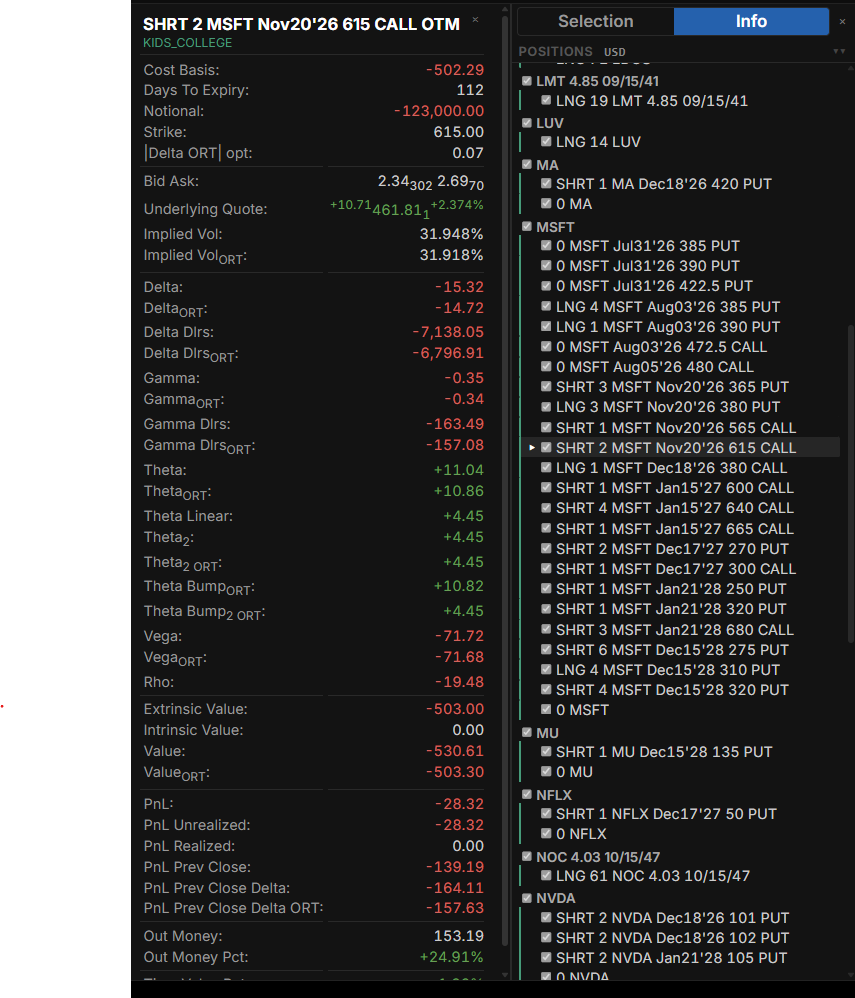
The panel is headed by the contract, its moneyness, and the account holding it. Below that, the fields are grouped:
- Contract: cost basis, days to expiry, notional, and strike
- Market: bid and ask, the underlying quote, and implied volatility
- Greeks: delta, gamma, theta, vega, and rho, each with its dollar form where one applies, and the theta variants (linear, second-order, and bump)
- Value: extrinsic value, intrinsic value, and position value
- PnL: total, unrealized, realized, and the change since the previous close
- Moneyness: distance out of the money, in points and as a percentage
Greeks and values are given both as reported by IBKR and as computed by OptionsRealTime, marked ORT. For what each field means, see Field Definitions.
Filtering from the component
Section titled “Filtering from the component”The panel holds no selection controls of its own. A component that supports filtering carries its own in its Controls row, so there is one place to choose from rather than two competing sets. On Underlying Exposure, for example, the choice is by underlying, type, side, or expiry.
Choosing there sets the filter. The panel then shows that selection, which can be adjusted by hand from there.