Account Selector
Every component in OptionsRealTime (charts, quotes, reports, tables, metrics) is fed by the accounts selected in the Account Selector. Changing the selection updates every component on the page.
The Account Selector runs down the left side of every page. It shows one button per connected account, plus an ALL button at the top.
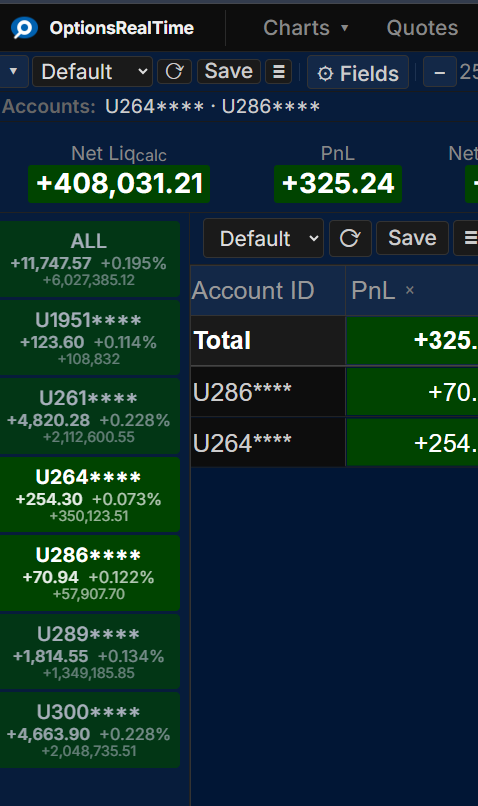
Each button shows the account ID, current PnL, percentage change, and net liquidation value, color-coded by the configured positive and negative theme colors. How the account ID is displayed (full, masked, obfuscated, or by name) is set by the Account IDs privacy mode in Settings.
The account buttons scale with the Account Sidebar font control (in Settings).
Selection Modes
Section titled “Selection Modes”Two mode buttons at the top of the selector control how account buttons behave.
Sticky mode (left button): Clicking an account toggles it on or off, allowing any combination of accounts to be selected. At least one account must remain selected, so the last selected account cannot be toggled off.
Radio mode (right button): Clicking an account selects only that account and deselects all others.
The ALL button selects every connected account in either mode. Every metric, chart, quote, table, and report on the page updates to reflect the selection.
Right-Click Menu
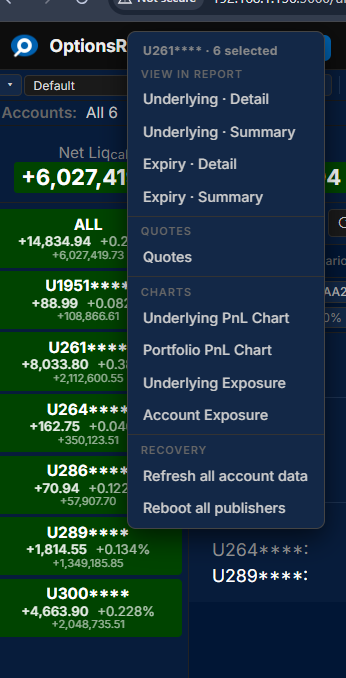
Section titled “Right-Click Menu”Right-clicking any account button opens a context menu with navigation to reports, quotes, and charts filtered to the selected accounts. The menu also includes system operations such as requesting a data resend from the back end or rebooting account analyzer processes to recover from a data interruption.