
OptionSmart
OptionSmart turns a live OptionsRealTime portfolio into a preformatted prompt you can analyze with the AI of your choice. The prompt captures exposure metrics and pricing information at the account, underlying, and position level and includes vol and price scenarios. Values aggregate across the accounts selected in the account selector.
Account numbers and personal information are stripped from the prompt. OptionsRealTime LLC does not collect, track, or share any of your data. The prompt is sent only when you choose to submit it to an AI.
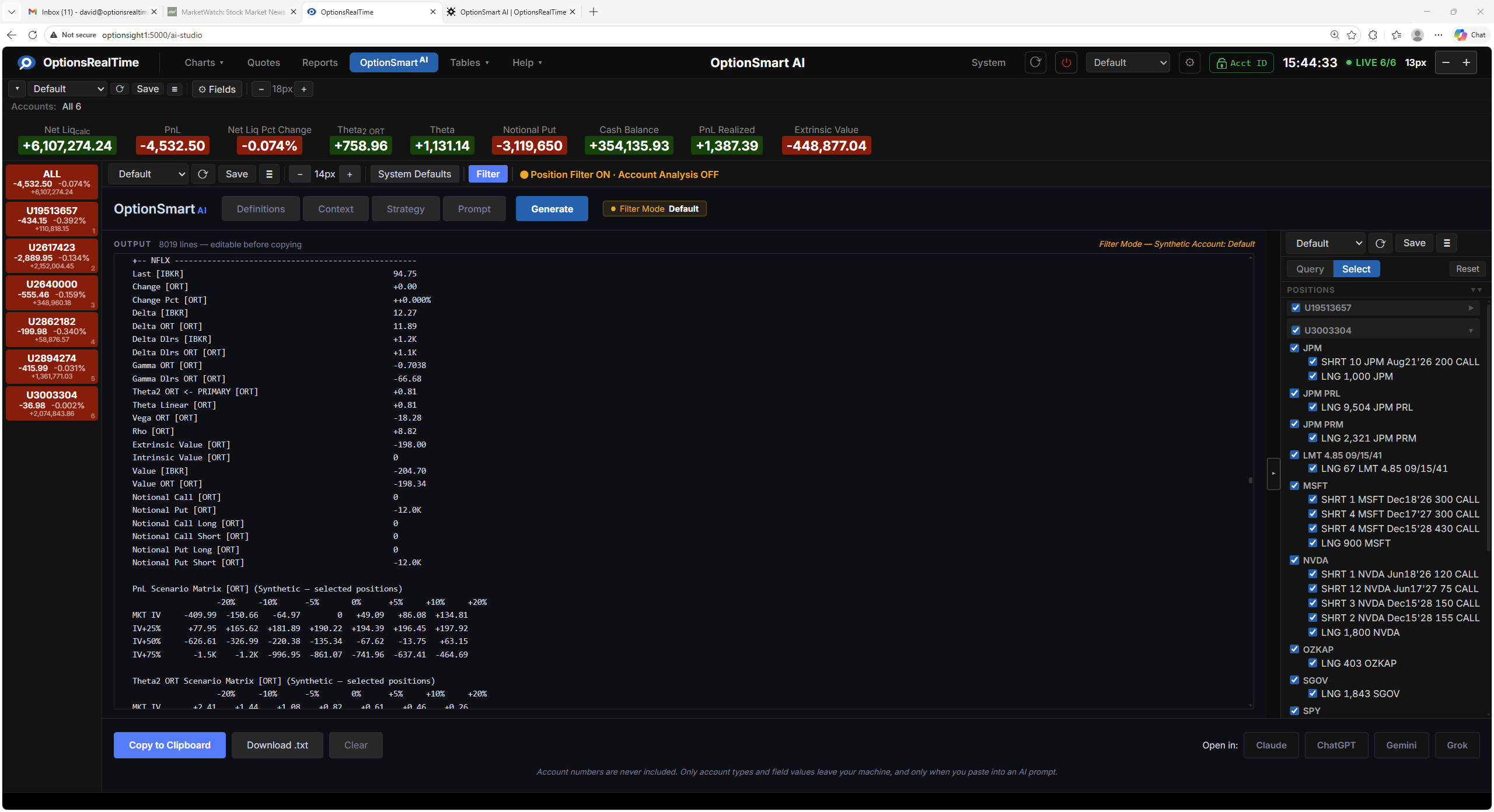
Toolbar
Section titled “Toolbar”- View selector: switch between named configurations
- Save OptionSmart View: save the current configuration
- View Actions (hamburger menu): Reload, Save As, Rename, and Delete the current view (Rename and Delete are unavailable for the Default view)
- Font size: controls the size of the output text
- System Defaults: load a system default Definition, Context, Strategy, and Prompt selection
- Filter: toggle the Position Filter panel on the right side of the component
- Position Filtering: selecting a subset of positions scopes the prompt to that subset in addition to the full portfolio
Position Filter
Section titled “Position Filter”OptionSmart supports the Position Filter for scoping analysis to a chosen subset of positions. Its selection controls narrow the choice by any combination of underlyings, type, side, or expiry, which can then be refined in the panel.
Opening the filter panel (via the Filter button or the control tab on the filter itself) and choosing a subset of positions makes OptionSmart analyze both the full portfolio and the chosen subset. This is useful for analyzing combinations such as iron condors, simple or complex spreads, and similar structures. The prompt still includes the full account for context (account-level aggregates and every underlying) and a focus list of the selected positions to be analyzed. For an underlying whose positions are only partially selected, that subset is also analyzed on its own. Unselected underlyings and positions remain in the account and contribute to all account-level totals.
Building the Brief
Section titled “Building the Brief”The prompt is assembled in four stages, each available as a tab. Move through them in any order, then click Generate.
Definitions
Section titled “Definitions”A description block of every metric included in the prompt, so the AI can interpret each field correctly. Covers ORT-specific fields such as Delta$ (ORT), Theta2 ORT, Margin Cushion Ratio, and the Notional variants, alongside IBKR-reported fields. Also includes the model conventions (IBKR vs ORT), sign conventions for Greeks, the notional vs risk caveat, the after-hours / pre-market PnL caveat that tells the AI to treat Daily PnL [IBKR] as unreliable outside regular trading hours, and the IRA account caveat noting that margin fields for IRA accounts reflect cash collateral only, not leverage.
Context
Section titled “Context”Analytical context that tells the AI how to weight and prioritize the portfolio snapshot. The default configuration organizes metrics into three tiers:
- Primary: metrics the AI should lead analysis with, such as Net Liquidation (ORT Realtime), NLV Daily % Change, Daily PnL (IBKR), Delta$ (ORT), Theta2 ORT, Vega (ORT), Excess Liquidity (individual accounts only), Margin Cushion Ratio (individual accounts only), Extrinsic Value Total, Notional, and Stock Market Value
- Secondary: supporting context including IBKR analytical Greeks (for comparison to ORT), Unrealized/Realized PnL, Cost Basis, Intrinsic Value, Rho, and instrument/position types
- Reference only: fields not to lead with, such as Full (overnight) margin, Lookahead margin, Accrued/FX Cash, Bond/Bill/Fund/Warrant, Futures PnL, and Net Dividend
Context also covers four important notes the AI should apply during analysis:
- Notional vs risk: do not alarm on high notional/NLV ratios alone; assess from scenarios
- Model differences (IBKR vs ORT): both models are provided; ORT (QuantLib) is more accurate, IBKR is what drives margin; note divergences, especially for theta
- Strategy agnosticism: make no strategy assumptions unless the Strategy section states one
- IRA accounts: IRA accounts operate on a cash basis; margin fields reflect cash collateral only, not leverage. Low Excess Liquidity or Available Funds in an IRA is not a margin risk. Only Individual accounts carry true margin risk.
Strategy
Section titled “Strategy”A plain-language description of the intended trading approach, used as context so the AI can assess positioning against the stated strategy. The default is an example; edit or replace to reflect the actual strategy.
Prompt
Section titled “Prompt”The questions and directives sent to the AI. The default prompt covers portfolio-wide risks, account-level positioning, sensitivity to volatility and price moves, daily performance attribution, and top-priority attention items. Edit, delete, or rewrite as needed.
Generate
Section titled “Generate”Click Generate to build the prompt from current live data. The output appears in the OUTPUT area and is editable before copying. The header shows the line count.
Output
Section titled “Output”- Copy to Clipboard: copy the output to your clipboard
- Download .txt: save the output as a text file
- Clear: empty the output area
Open in
Section titled “Open in”Opens the chosen AI in a new tab with the prompt ready to paste:
- Claude
- ChatGPT
- Gemini
- Grok
Privacy
Section titled “Privacy”- Account numbers are stripped from the prompt
- No personal information is written to the output
- OptionsRealTime LLC does not collect, track, or share any of your data
- The prompt is sent only when you choose to submit it to an AI
Editing the Output
Section titled “Editing the Output”The output area is editable before you copy. Trim sections, add notes, or rewrite the prompt. What ends up on your clipboard is exactly what you see.