
Vol Scenario Chart
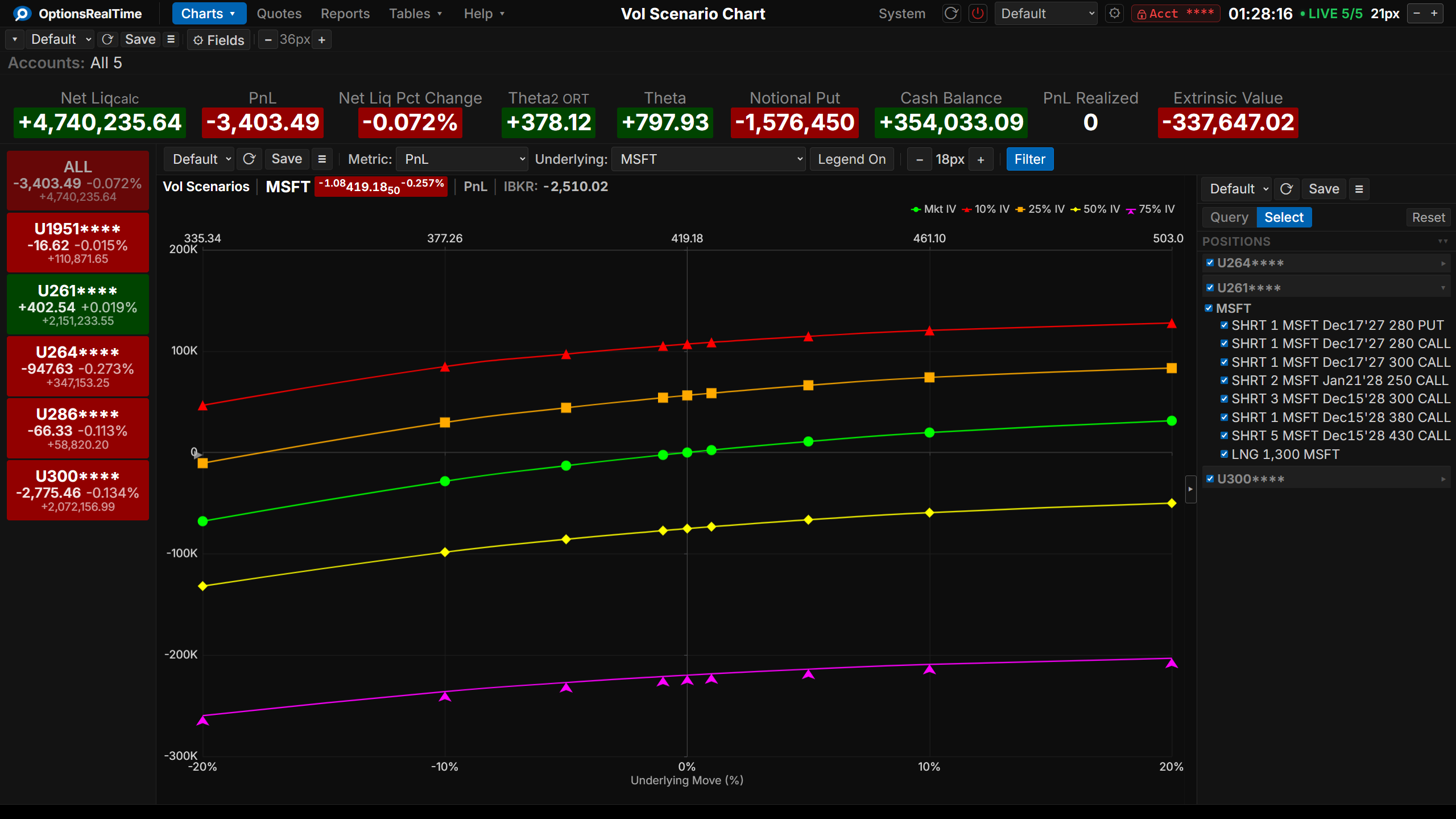
The Vol Scenario Chart shows how a metric changes as the underlying price moves, at different volatility levels. Each curve is one volatility scenario. Values are summed across the selected accounts.
The X-axis shows underlying price moves, from -20% to +20% in normal mode. The markers on each curve show the available scenario steps.
Toolbar
Section titled “Toolbar”- View selector: switch between saved configurations
- Save Vol Scenario View: save the current setup
- View Actions (hamburger menu): Reload, Save As, Rename, and Delete the current view. Rename and Delete are not available for the Default view.
- Underlying: pick which underlying to view
- Metric: pick the metric to chart, including PnL, Theta, Delta, Delta$, Gamma, Gamma$, Vega, Value, Extrinsic Value, and PnL Unrealized
- Reset Zoom: return the chart to the default view
- Labels: show or hide the label at the right end of each curve
- Custom: toggle Custom mode, which prices the selected positions at several dates and volatilities at once. See Custom Mode.
- Range selector: sets the price range. Appears only in Custom mode; normal mode is always ±20%.
- Dates: pick which dates to plot. Appears only in Custom mode. See Dates.
- Scenario buttons: pick which volatility curves to show. See Scenario buttons.
- Custom value chips: in Custom mode, two chips at the end of the scenario row set a market-relative shift and an absolute volatility. Each has a slider under it. See Custom value chips.
- Filter: show or hide the Position Filter panel on the right
The Controls chevron at the right of the title band hides and shows the control rows, giving the chart the full height of the page. The setting is kept per component.
Scenario buttons
Section titled “Scenario buttons”The scenario buttons choose which volatility curves are drawn. They fall into two groups.
Market-relative. MktIV prices at the current market implied volatility. -5%, -2%, +2%, and +5% shift each option’s market implied volatility by that many points, which preserves the shape of the volatility surface.
Fixed. The buttons after the IV: label, 10%, 25%, 50%, and 75%, price every option at that one volatility, discarding the surface.
Any combination can be shown, and at least one selection has to stay on. In Custom mode the two custom value chips count as selections, so MktIV can be turned off while a chip is on.
Custom Mode
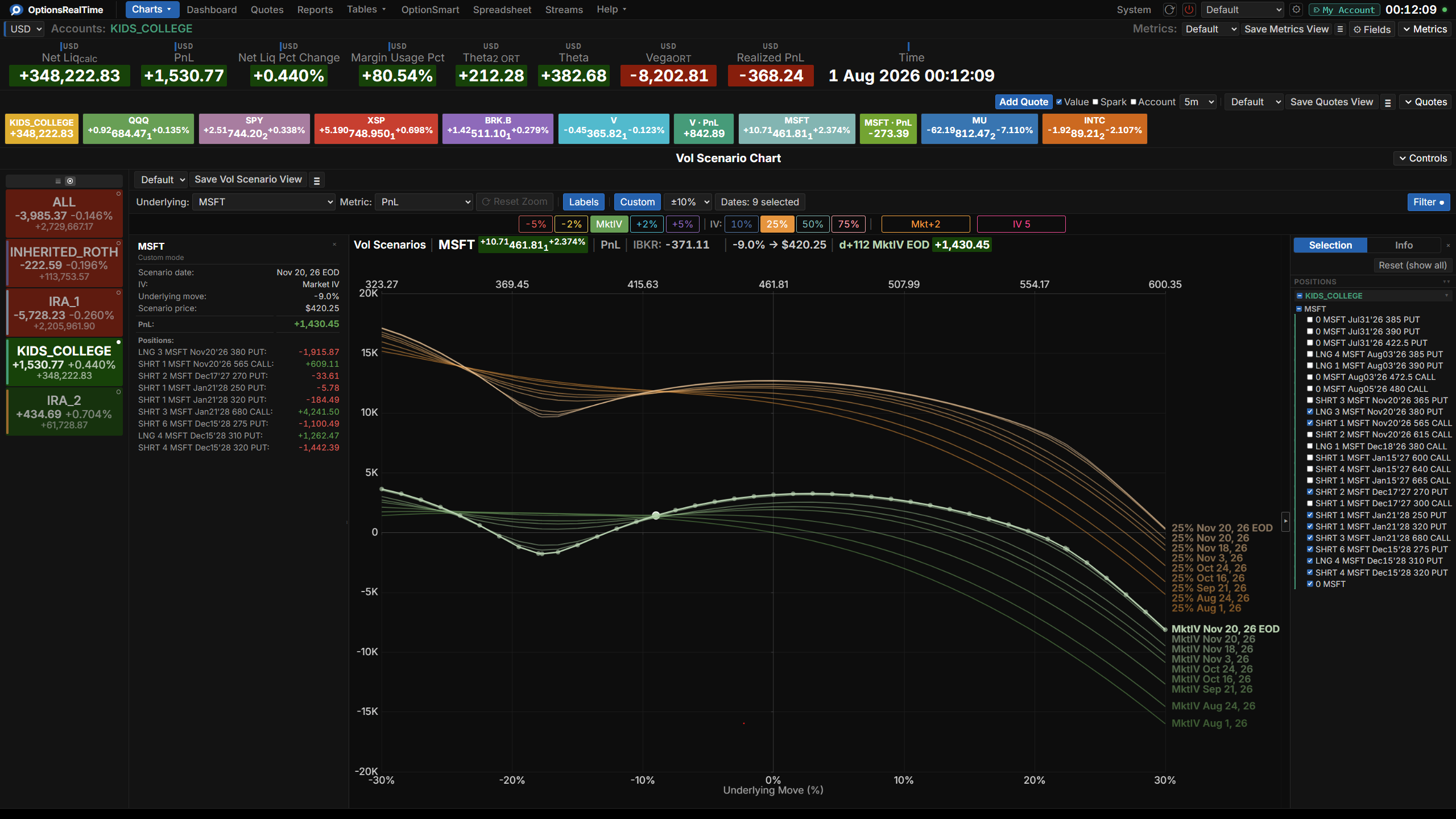
Section titled “Custom Mode”Custom mode prices the selected positions at the chosen dates and volatilities, drawing one curve for every date and volatility pair.
Press Custom to turn it on. The Range selector, the Dates control, and the two custom value chips become available. Press it again to return to normal mode.
Picking positions
Section titled “Picking positions”Custom mode uses the same Position Filter as the normal chart. Any positions from any accounts can be selected and are priced together, whether that is a single position, one spread, or the whole book.
Price range
Section titled “Price range”The Range selector sets the price range: ±10%, ±20%, ±30%, or ±50%. Normal mode is always ±20%.
The price ladder is built in 1% steps, with one extra point at the strike nearest the current price. The step size scales with the range, so the number of points stays about the same at every setting.
The list of dates is built from the selected positions. It starts at today and ends at the earliest expiration in the selection.
Two of the choices are special:
- Expiry: the expiration date, priced as if one day is left, so some time value remains.
- EOD (settle): the end of the expiration date with no time value left. Only intrinsic value remains, which is why the curve breaks into straight segments that bend at each strike.
Every selected date draws its own set of curves, so five dates and four volatilities give twenty curves.
Custom value chips
Section titled “Custom value chips”Two chips sit at the end of the scenario button row and appear only in Custom mode. Each shows its current value on its face.
- Market-relative: labelled
Mkt+2.75orMkt-7.5. The value is a shift in volatility points applied to each option’s market implied volatility, from -50 to +50 in steps of 0.25. At zero the chip readsMktand draws the same curve as MktIV. - Absolute volatility: labelled with the volatility, such as
IV 37. Every option is priced at that level, from 5 to 150 in steps of 1.
Changing a value. There are three ways, and no typing.
The slider under each chip covers the whole range in one drag, which is the way to get close to a target quickly.
Moving the pointer onto a chip reveals a minus arrow on its left and a plus arrow on its right. Clicking an arrow moves the value one step. Holding an arrow down repeats the step, starting after about half a second and then speeding up. The arrows are the way to finish the last step or two.
Rolling the mouse wheel over a chip also moves it one step.
All three use the same step and stop at each end of the range.
Turning a chip on or off. Clicking the middle of a chip toggles it. A chip that is on is filled with its color and carries black text, and one that is off is drawn as an outline. The value is kept while the chip is off, so turning it back on restores the same curve.
Repricing waits 400 milliseconds after the last step, so clicking through a range of values sends a single request at the end. If a custom value matches a preset that is already on, only one curve is drawn.
Color follows value. A chip takes its color from its current value rather than carrying a fixed one. The preset scenarios are fixed points on that scale, so a chip sitting exactly on a preset takes that preset’s color, and any value between two of them blends the pair. Cooler colors run toward a volatility crush and warmer ones toward a spike, so the size and direction of the shift can be read off the chip. A single step changes the color only slightly, since the color has to track the value across the whole range.
Curve colors. A preset curve takes its scenario’s color, and the shade varies across the selected dates, so a curve can be traced back to its scenario and date without reading its label. A custom chip’s curve takes the chip’s color, which keeps two custom curves at different values distinguishable.
Pricing
Section titled “Pricing”Each option is priced by the model that matches its underlying. Options on futures use Black-76 American. Options on an index use Black-Scholes European. Everything else, including stock and ETF options, uses Black-Scholes American.
Reading the chart
Section titled “Reading the chart”Each curve carries a label at its right end. In normal mode that is the scenario name on its own, such as MktIV, 25%, or +5%. In Custom mode the date is appended, giving MktIV Nov 20, 26 or 25% Nov 20, 26 EOD. The Labels button hides and shows them.
Moving the pointer across the plot highlights the curve beneath it, shows that curve’s sample points, and marks the point nearest the pointer with a ring. Clicking locks the selection, and clicking empty space releases it. The readout is always active and has no button of its own.
The header above the chart summarizes the selected point: the underlying with its price and change, the metric, the IBKR value, the underlying move and the scenario price it implies, the volatility label, and the metric’s value in that scenario.
Side panel
Section titled “Side panel”The left panel describes the selected point, and what it holds depends on the mode.
In normal mode it lists every metric at that point, not only the charted one, followed by the selected metric broken down by account and then by position.
In Custom mode it lists the scenario date, the volatility, the underlying move, and the scenario price, followed by the selected metric and each position’s contribution to it.
Saving
Section titled “Saving”Saving a Vol Scenario View in Custom mode stores whether Custom mode is on, the price range, the selected dates, the selected scenario buttons, both custom values, the on or off state of each chip, and the position selection. Reloading the view, or returning to the chart after navigating away, restores all of it.
Dates are saved as calendar dates. If a saved view is opened after some of those dates have passed, they are dropped and the remaining dates are restored. A short note indicates that some saved dates were no longer available.
Position Filter
Section titled “Position Filter”The Vol Scenario Chart covers one underlying at a time, so it has no selection controls of its own. Positions can be selected in the Position Filter panel on the right.
Chart Interaction
Section titled “Chart Interaction”- Left-click drag: pan
- Shift + left-click drag: draw a vertical band to zoom to that price range
- Mousewheel: zoom the price axis
- Double-click: return to the default view
- Right-click: open the menu
- Reset Zoom (in the toolbar): return to the default view
The value axis refits to the visible price range while zooming or panning.