
Tables
OptionsRealTime presents data in four real-time tables. Each table has a standard component toolbar for view management and column selection. The contents reflect the accounts selected in the account selector. Most tables include a Total row at the top that sums values for metrics that support aggregation: PnL, Net Liq Value, Theta, Vega, and Delta Dollars.
| Table | Description |
|---|---|
| Position | Per-position detail with full Greeks and metrics |
| Underlying | Data aggregated by underlying, plus underlying-specific metrics |
| Portfolio | Account-level balances and summary metrics |
| System | Data streaming health and connection diagnostics |
Toolbar
Section titled “Toolbar”All tables share a standard toolbar:
- View selector: switch between named configurations
- Save: save the current configuration; the button label reflects the active table (Save Position View, Save Underlying View, Save Portfolio View, Save System View)
- View Actions (hamburger menu): Reload, Save As, Rename, and Delete the current view (Rename and Delete are unavailable for the Default view)
- Columns: open the column picker side panel
- Auto Size: auto-fit all column widths to cell contents
- Clear Sort (Position and Underlying tables): remove every column sort; see Sorting
- Font size: controls the size of table text
The Position Table adds a Filter button that opens the Position Filter panel, and a Delete Tags button (see Tagging). The Underlying Table adds additional controls described below.
Position Table
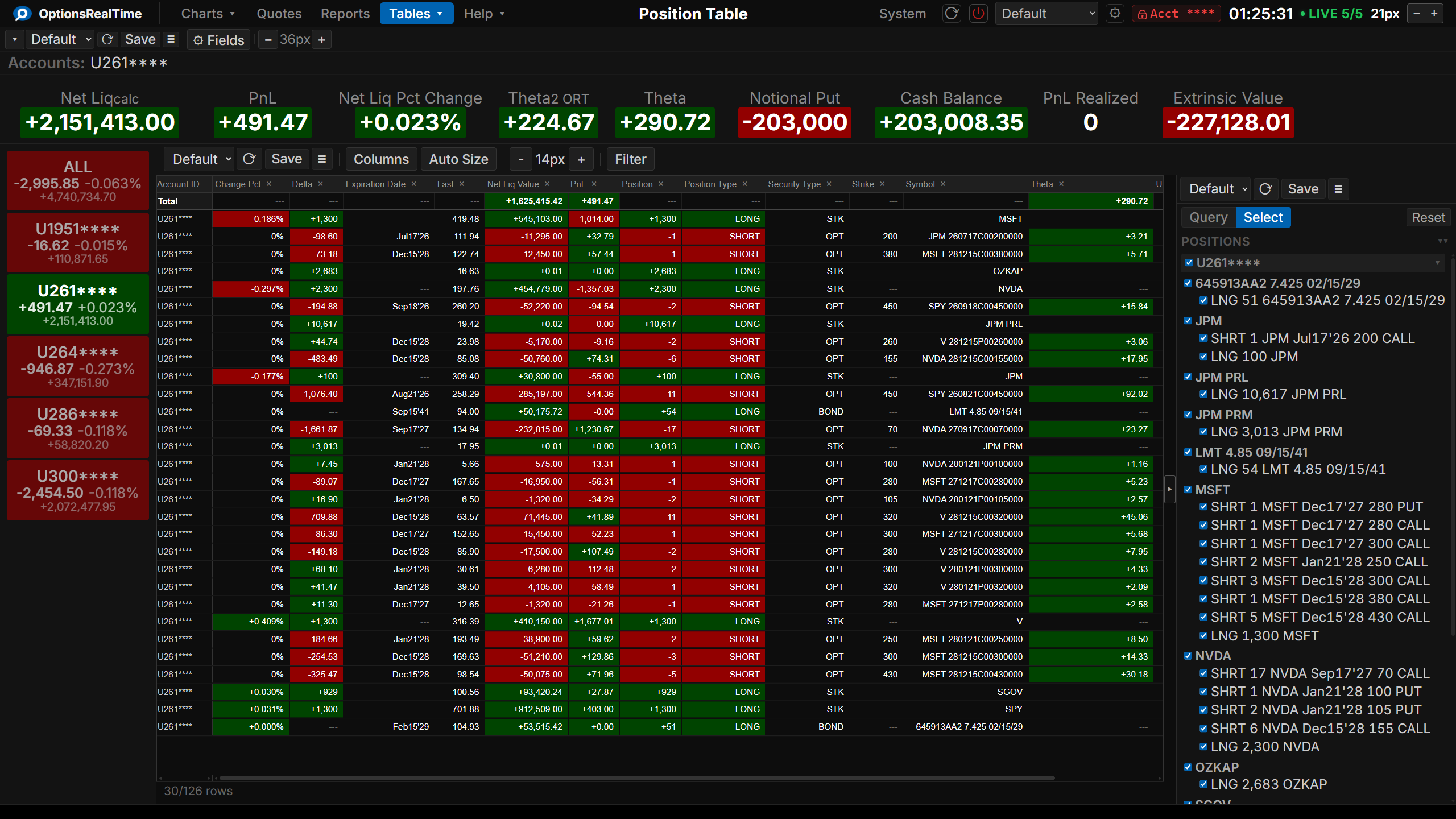
Section titled “Position Table”The Position Table displays per-position detail for every individual security in the portfolio. Each row represents a single position with its market data, Greeks, and calculated metrics.
Position Filter
Section titled “Position Filter”This table supports the Position Filter, a right-side panel that narrows the table to a chosen subset of positions. Toggle it with the Filter button in the toolbar. Its selection controls narrow the choice by any combination of underlyings, type, side, expiry, or tag, which can then be refined in the panel.
Tagging
Section titled “Tagging”A tag is a name that the user assigns to a position. Positions that share a tag name form a group. The tag appears in the Tag column, and the Reports component can group positions by tag.
A tag belongs to the contract in one account. It stays on the position when the position is closed and reopened. Rolling a position creates a new contract, so the new contract needs a new tag. Tags are shared: every browser on the network sees the same tags, and tags survive restarts.
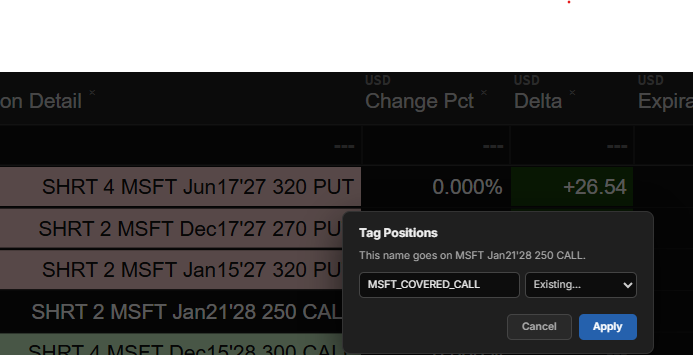
Tag Row in the row menu opens a dialog that assigns a tag to the clicked position. Type a name, or pick an existing name from the dropdown next to the input field. Picking a name fills the input field, so a name is typed once and picked afterward. A name must be at least 2 characters and at most 40 characters. Apply saves the tag, and the tag appears in the Tag column within a few seconds.
Remove Tag in the row menu clears the tag from the clicked position. The item appears only when the position has a tag.
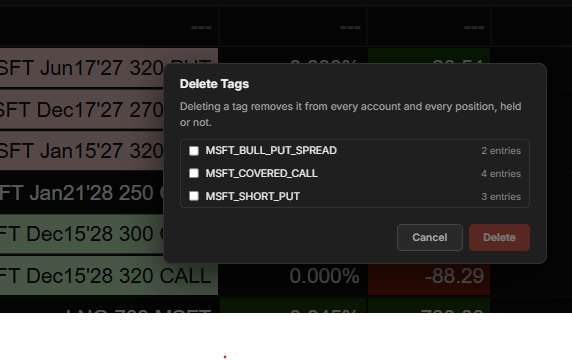
Delete Tags in the toolbar removes tag names entirely. It opens a checklist of every tag name, with the number of entries that carry each name. A name that no current position carries is marked not held. This happens when tagged positions are closed or expire. Check one or more names and click Delete. The checked names are removed from every account and every position, held or not.
The Tag dropdown in the Position Filter selection controls narrows the table to chosen tags. Positions without a tag are listed under (untagged). The Tag column sorts like any other column.
Underlying Table
Section titled “Underlying Table”The Underlying Table shows data aggregated by underlying. Metrics that can be summed (Delta, Theta, Vega, PnL, etc.) are aggregated across all positions for each underlying. The table also includes underlying-specific data such as the current quote, change, and percent change.
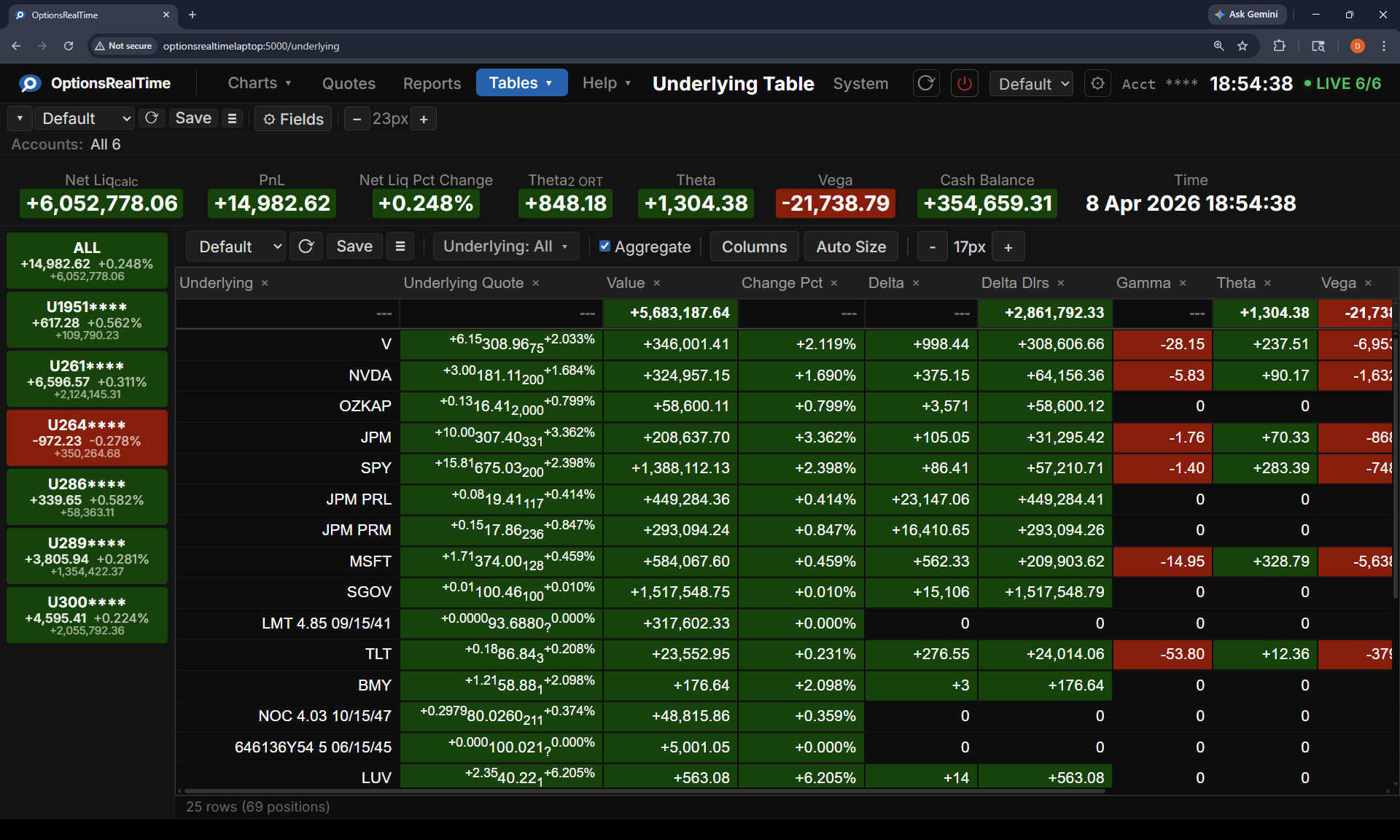
In addition to the standard toolbar, the Underlying Table includes:
- Underlying: filter by one or more underlying symbols
- Aggregate: toggle row aggregation across selected accounts
Portfolio Table
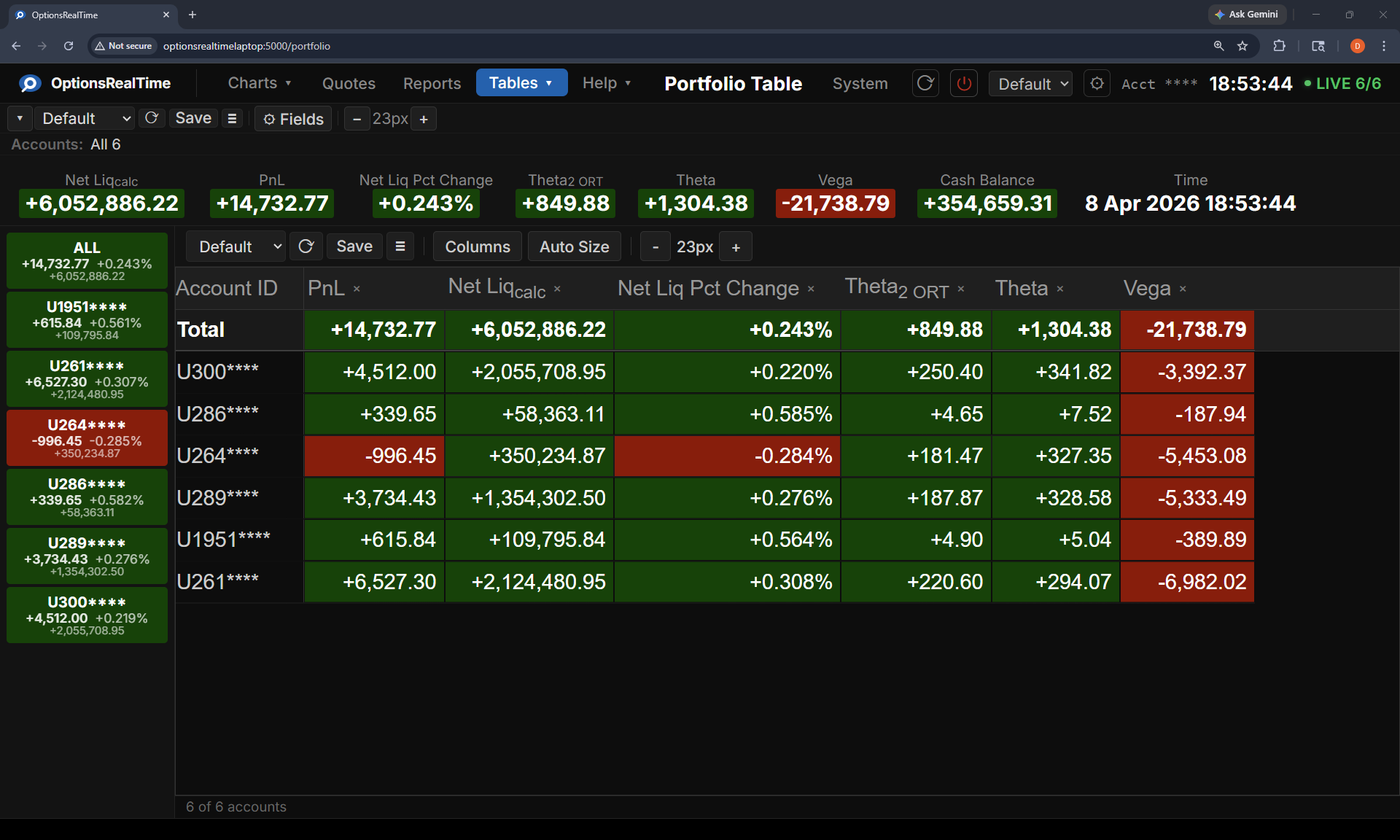
Section titled “Portfolio Table”The Portfolio Table contains account-level data including net liquidation value, PnL, percent change, Greeks totals, cash balance, and other portfolio summary metrics. Each row represents one account, with a Total row at the top.
System Table
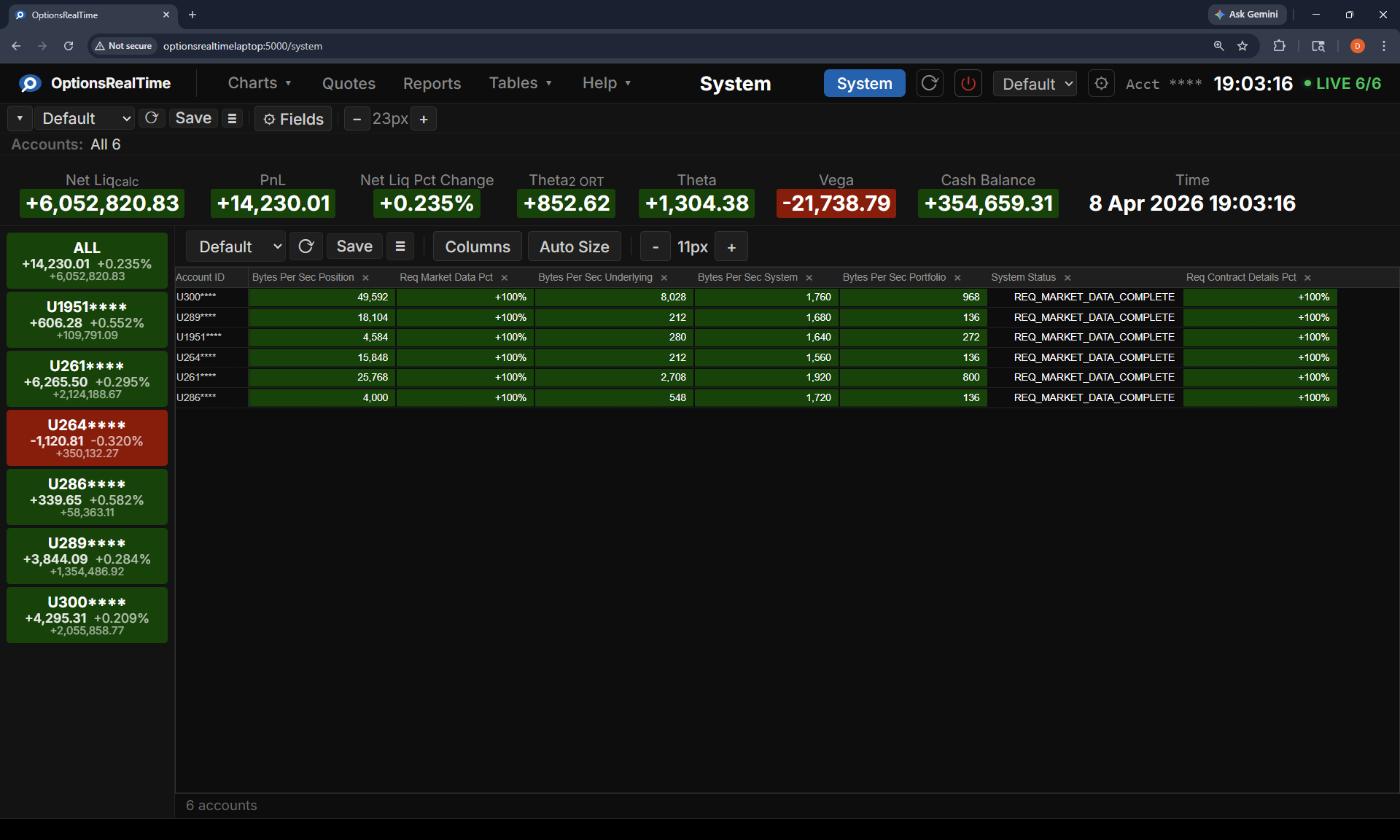
Section titled “System Table”The System Table displays data for monitoring system internals and data integrity. Each row represents one account with metrics such as bytes per second, request rates, system status, and request completion status. Useful for diagnosing data flow and connection issues. The System Table has no Total row since its metrics are not summable.
Column Selection
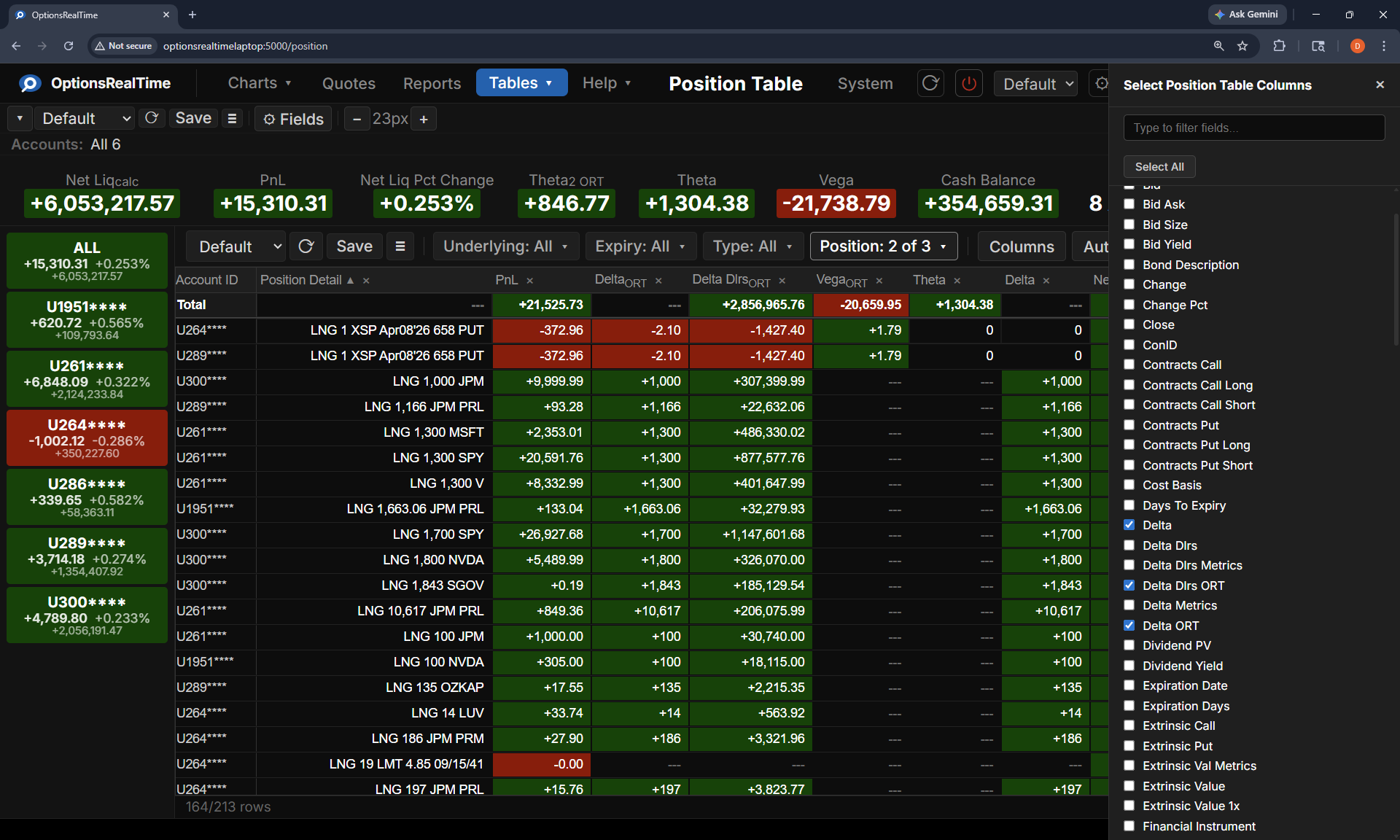
Section titled “Column Selection”Clicking Columns in the toolbar opens a side panel listing every available column for the table with a checkbox. Checked columns appear in the table. A search box at the top filters the list by column name. Column selection is saved with the table view.
Column Menu
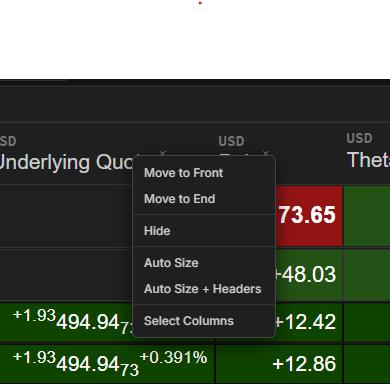
Section titled “Column Menu”Right-clicking a column header opens a menu of column actions:
- Move to Front: move the column to the beginning of the table
- Move to End: move the column to the end of the table
- Hide: remove the column from the table
- Auto Size: size the column to fit its contents
- Select Columns: open the Columns side panel
Row Menu
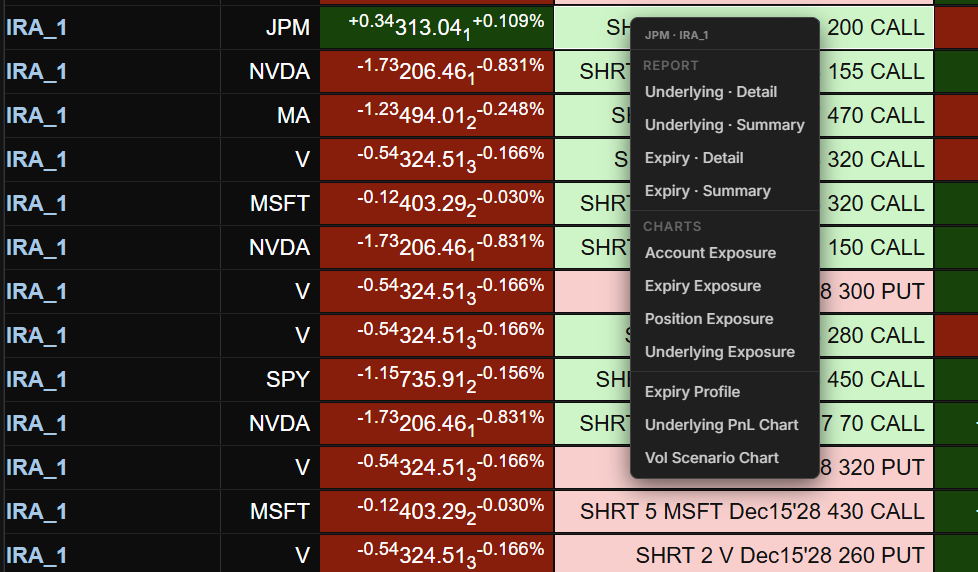
Section titled “Row Menu”Right-clicking a row opens a menu that navigates to a Report or Chart page using the row as context. The menu header shows the context that will be passed.
| Table | Context |
|---|---|
| Position | Account and underlying from the clicked row |
| Underlying | Underlying from the clicked row, applied across all selected accounts |
| Portfolio | Account from the clicked row |
Position and Underlying menus group destinations into sections:
- Tag (Position menu only): Tag Row and Remove Tag act on the clicked position; see Tagging
- Report: Underlying · Detail, Underlying · Summary, Expiry · Detail, Expiry · Summary
- Charts: Underlying PnL Chart, Underlying Exposure, Account Exposure, Position Exposure, Vol Scenario Chart, Expiry Profile Chart
The Portfolio menu has a layout suited to account-level navigation:
- View in Report: Underlying · Detail, Underlying · Summary, Expiry · Detail, Expiry · Summary
- Quotes: Quotes
- Charts: Underlying PnL Chart, Portfolio PnL Chart, Underlying Exposure, Account Exposure, Expiry Profile Chart
Sorting
Section titled “Sorting”Click a column name in the header to sort the table by that column, lowest value first. Click again to sort highest value first. Click a third time to remove the sort.
The Position Table and the Underlying Table sort by more than one column. Hold Shift and click a second column name to add it as the second sort. Rows with equal values in the first column are ordered by the second column. Hold Shift and click again to add a third or fourth column. Each Shift-click on a sorted column reverses that column’s direction.
The status bar at the bottom of the table shows the sort order after the row count. Example: Sort: PnL Daily ▼ → Contract Currency ▲ → Strike ▲. The first column listed is the first sort. The sort line disappears when no column is sorted.
A Clear Sort button appears after the Auto Size button in the Position Table and Underlying Table toolbars. It removes every sort.

The sort order is saved with the table view.
The Portfolio Table and the System Table sort by one column at a time.