
Settings
The gear icon in the navigation bar opens the Settings dialog. Settings are global and apply across all components. Like components and metrics, Settings supports Save and View Actions (Save As, Rename, Delete) and must have a Default view.
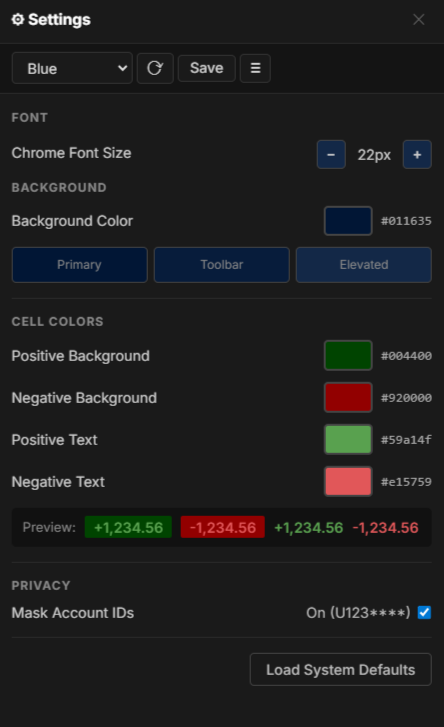
Build and save named color themes. Each theme controls:
- Background color: primary, toolbar, and elevated surface colors
- Chrome font size: size of all UI controls
- Cell colors: positive and negative background colors, configurable independently
- Text colors: positive and negative text colors, configurable independently
- Preview: live preview of positive and negative values before saving
Save a theme with a name and it appears in the theme selector dropdown in the navigation bar. Selecting a theme from the dropdown saves it to the server, making it the startup theme for all browsers on the network.
Privacy
Section titled “Privacy”- Mask Account IDs: when checked, masks the last 4 digits of account IDs with asterisks. Useful for screenshots or screen sharing.
System Defaults
Section titled “System Defaults”Load System Defaults restores all settings to the installed defaults.