
Excel
OptionsRealTime provides a comprehensive Excel RTD (Real-Time Data) API that streams live portfolio data directly into spreadsheets.
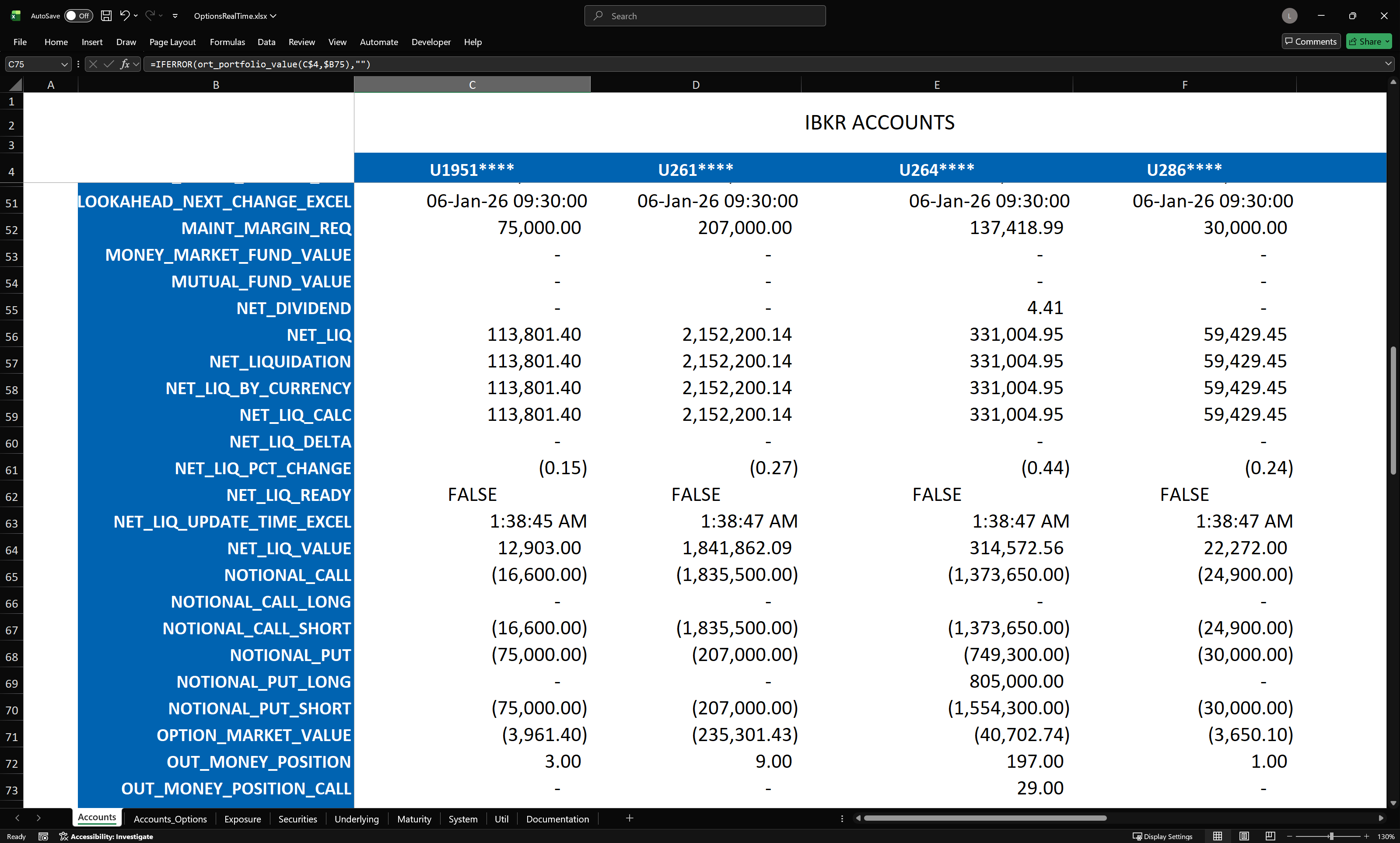
Overview
Section titled “Overview”The Excel integration connects to the same distributed table architecture that powers the desktop application. Because Excel is a universal listener to all data published on the NATS data stream, it can receive data from all accounts simultaneously. Unlike each UI process which focuses on data visualization for a single account, a single Excel sheet can display metrics for all accounts side by side. Users with multiple accounts can compare metrics, sum values such as PnL or Net Liquidation Value, and create fully aggregated views across their entire portfolio, regardless of which account positions reside.
Every field available in the UI is accessible in Excel via RTD functions. As new fields are added to the system, they become immediately available in Excel without any updates required.
The API is self-discoverable: functions exist to enumerate accounts, tables, fields, and values. This allows building dynamic spreadsheets that adapt to your portfolio automatically.
Getting Started
Section titled “Getting Started”- Ensure OptionsRealTime Rover is running and connected to TWS (no user interfaces need to be running)
- Open the provided
OptionsRealTime.xlsxtemplate or create a new workbook - RTD functions automatically connect to the NATS data stream
Configuration
Section titled “Configuration”The Excel RTD add-in reads its settings from OptionsRealTime.ini, located in the installation folder (typically C:\Users\<username>\AppData\Local\OptionsRealTime\).
You can edit this file using the shortcut: OptionsRealTime → Advanced → Edit Excel RTD Config
[Addin]LogLevel="trace"LogPopupLevel="error"DateFormats=["%Y-%m-%d", "%Y%b%d"]
[OptionsRealTime]NatsUrl="nats://localhost:4222"RtdThrottleMs=250MaskSize=4| Setting | Description |
|---|---|
NatsUrl | NATS server address. Default is localhost:4222. |
RtdThrottleMs | Minimum interval between Excel updates in milliseconds. Lower = more responsive, higher = less CPU usage. |
MaskSize | Number of characters to mask in account IDs (for privacy when sharing screenshots). |
Multi-Machine Setup
Section titled “Multi-Machine Setup”If you’re running Excel on a different machine than NATS and Rover, you need to point Excel to the NATS server’s IP address:
- Open OptionsRealTime → Advanced → Edit Excel RTD Config
- Change
NatsUrlfromlocalhostto your NATS server’s IP:NatsUrl="nats://192.168.1.100:4222" - Save and restart Excel
See the Multi-Machine Setup guide for complete instructions.
Function Reference
Section titled “Function Reference”Real-Time Data
Section titled “Real-Time Data”These functions return live values from the four core tables.
| Function | Description | Arguments |
|---|---|---|
ort_portfolio_value | Returns live portfolio field value | account ID, field name |
ort_system_value | Returns live system field value | account ID, field name |
ort_security_value | Returns live security field value | account ID, contract ID or symbol, field name |
ort_exposure_value | Returns live exposure field value | account ID, contract ID or underlying, field name |
Scenario Metrics
Section titled “Scenario Metrics”Access the 5×9 implied volatility and price move scenario grid.
| Function | Description | Arguments |
|---|---|---|
ort_security_metric | Returns metric value from scenario grid for a security | account ID, contract ID or symbol, metric field, IV label, move label |
ort_exposure_metric | Returns metric value from scenario grid for an underlying | account ID, contract ID or underlying, metric field, IV label, move label |
ort_underlying_metric_price | Returns underlying price at specified move scenario | account ID, underlying, move label |
Account Discovery
Section titled “Account Discovery”| Function | Description | Arguments |
|---|---|---|
ort_accounts_size | Returns count of connected accounts | (none) |
ort_accounts_at | Returns account ID at 1-based index | index |
ort_accounts_masked_size | Returns count of connected accounts | (none) |
ort_accounts_masked_at | Returns masked account ID at 1-based index | index |
Security Discovery
Section titled “Security Discovery”| Function | Description | Arguments |
|---|---|---|
ort_security_conids_size | Returns count of securities for account | account ID |
ort_security_conids_at | Returns security contract ID at 1-based index | account ID, index |
ort_security_symbols_size | Returns count of security symbols for account | account ID |
ort_security_symbols_at | Returns security symbol at 1-based index | account ID, index |
ort_security_expirations_size | Returns count of unique expiration dates | account ID |
ort_security_expirations_at | Returns expiration date at 1-based index (sorted ascending) | account ID, index |
Security Filter by Underlying
Section titled “Security Filter by Underlying”| Function | Description | Arguments |
|---|---|---|
ort_security_conids_by_underlying_size | Returns count of securities for a given underlying | account ID, underlying |
ort_security_conids_by_underlying_at | Returns conId at index for underlying | account ID, underlying, index |
ort_security_symbols_by_underlying_size | Returns count of securities for a given underlying | account ID, underlying |
ort_security_symbols_by_underlying_at | Returns symbol at index for underlying | account ID, underlying, index |
Security Filter by Expiration
Section titled “Security Filter by Expiration”| Function | Description | Arguments |
|---|---|---|
ort_security_conids_by_expiration_size | Returns count of securities for a given expiration date | account ID, expiration |
ort_security_conids_by_expiration_at | Returns conId at index for expiration | account ID, expiration, index |
ort_security_symbols_by_expiration_size | Returns count of securities for a given expiration date | account ID, expiration |
ort_security_symbols_by_expiration_at | Returns symbol at index for expiration | account ID, expiration, index |
Exposure Discovery
Section titled “Exposure Discovery”| Function | Description | Arguments |
|---|---|---|
ort_exposure_conids_size | Returns count of underlyings for account | account ID |
ort_exposure_conids_at | Returns underlying contract ID at index | account ID, index, [sort field], [sort order] |
ort_exposure_underlyings_size | Returns count of underlying symbols for account | account ID |
ort_exposure_underlyings_at | Returns underlying symbol at index | account ID, index, [sort field], [sort order] |
ort_exposure_underlyings_size_by_metric | Returns count of underlying symbols (metric-sorted) | account ID, metric field, IV label, move label |
ort_exposure_underlyings_at_by_metric | Returns underlying symbol at index, sorted by metric value | account ID, index, metric field, IV label, move label, sort order |
Notes:
- Parameters in [brackets] are optional
- Metric field:
PNL_METRICS,DELTA_METRICS,GAMMA_METRICS,THETA_METRICS,VEGA_METRICS,DELTA_DLRS_METRICS,GAMMA_DLRS_METRICS,VALUE_METRICS,PNL_UNREALIZED_METRICS,EXTRINSIC_VAL_METRICS - IV label:
MKT,IV10,IV25,IV50,IV75 - Move label:
-20%,-10%,-5%,-1%,0%,+1%,+5%,+10%,+20% - Sort order:
DESC(highest first, default) orASC(lowest first) _by_metricfunctions sort underlyings by a specific cell in the 5×9 metric grid (e.g., PNL at MKT/0% or DELTA at IV25/+5%)
Field Discovery
Section titled “Field Discovery”Enumerate available fields for each table.
| Function | Description | Arguments |
|---|---|---|
ort_system_fields | Returns array of valid System table field names | (none) |
ort_system_fields_size | Returns count of System table fields | (none) |
ort_system_fields_at | Returns System field name at 1-based index | index |
ort_portfolio_fields | Returns array of valid Portfolio table field names | (none) |
ort_portfolio_fields_size | Returns count of Portfolio table fields | (none) |
ort_portfolio_fields_at | Returns Portfolio field name at 1-based index | index |
ort_security_fields | Returns array of valid Security table field names | (none) |
ort_security_fields_size | Returns count of Security table fields | (none) |
ort_security_fields_at | Returns Security field name at 1-based index | index |
ort_exposure_fields | Returns array of valid Exposure table field names | (none) |
ort_exposure_fields_size | Returns count of Exposure table fields | (none) |
ort_exposure_fields_at | Returns Exposure field name at 1-based index | index |
Metric and Scenario Labels
Section titled “Metric and Scenario Labels”| Function | Description | Arguments |
|---|---|---|
ort_move_labels | Returns array: -20%, -10%, -5%, -1%, 0%, +1%, +5%, +10%, +20% | (none) |
ort_move_labels_size | Returns count of move scenario labels (9) | (none) |
ort_move_labels_at | Returns move label at 1-based index | index |
ort_iv_labels | Returns array: MKT, IV10, IV25, IV50, IV75 | (none) |
ort_iv_labels_size | Returns count of IV scenario labels (5) | (none) |
ort_iv_labels_at | Returns IV label at 1-based index | index |
ort_metric_fields | Returns array of valid metric field names | (none) |
ort_metric_fields_size | Returns count of metric field names (8) | (none) |
ort_metric_fields_at | Returns metric field name at 1-based index | index |
Account Masking
Section titled “Account Masking”| Function | Description | Arguments |
|---|---|---|
ort_get_mask_size | Returns current account mask size (number of asterisks) | (none) |
ort_set_mask_size | Sets account mask size (1-8) and returns actual value | size |
ort_mask_account | Masks an account ID (e.g., U2641234 → U264****) | account ID |
ort_unmask_account | Converts masked account ID to real account ID | masked account ID |
Connection and Control
Section titled “Connection and Control”| Function | Description | Arguments |
|---|---|---|
ort_nats_state | Returns live NATS connection state | (none) |
ort_nats_start | Starts NATS connection | (none) |
ort_nats_stop | Stops NATS connection | (none) |
ort_nats_init | Starts or stops NATS connection | start (TRUE/FALSE) |
ort_request_refresh | Request full data refresh for an account | account ID |
ort_request_refresh_all | Request full data refresh for all known accounts | (none) |
Configuration
Section titled “Configuration”| Function | Description | Arguments |
|---|---|---|
ort_config_url | Returns configured NATS URL from ini file | (none) |
ort_config_throttle | Returns current RTD throttle interval in ms | (none) |
ort_set_rtd_throttle_msec | Sets RTD throttle interval (50-60000 ms) | milliseconds |
Utility
Section titled “Utility”| Function | Description | Arguments |
|---|---|---|
ort_version | Returns ORT version and build info | (none) |
ort_utc_now | Returns current UTC date/time (YYYY-MM-DD HH:MM:SS) | (none) |
ort_utc_now_rtd | Returns live UTC time (RTD) | (none) |
Template Workbook
Section titled “Template Workbook”OptionsRealTime includes a template workbook (OptionsRealTime.xlsx) with pre-built tabs demonstrating common use cases:
-
Accounts: Portfolio summary across all accounts
-
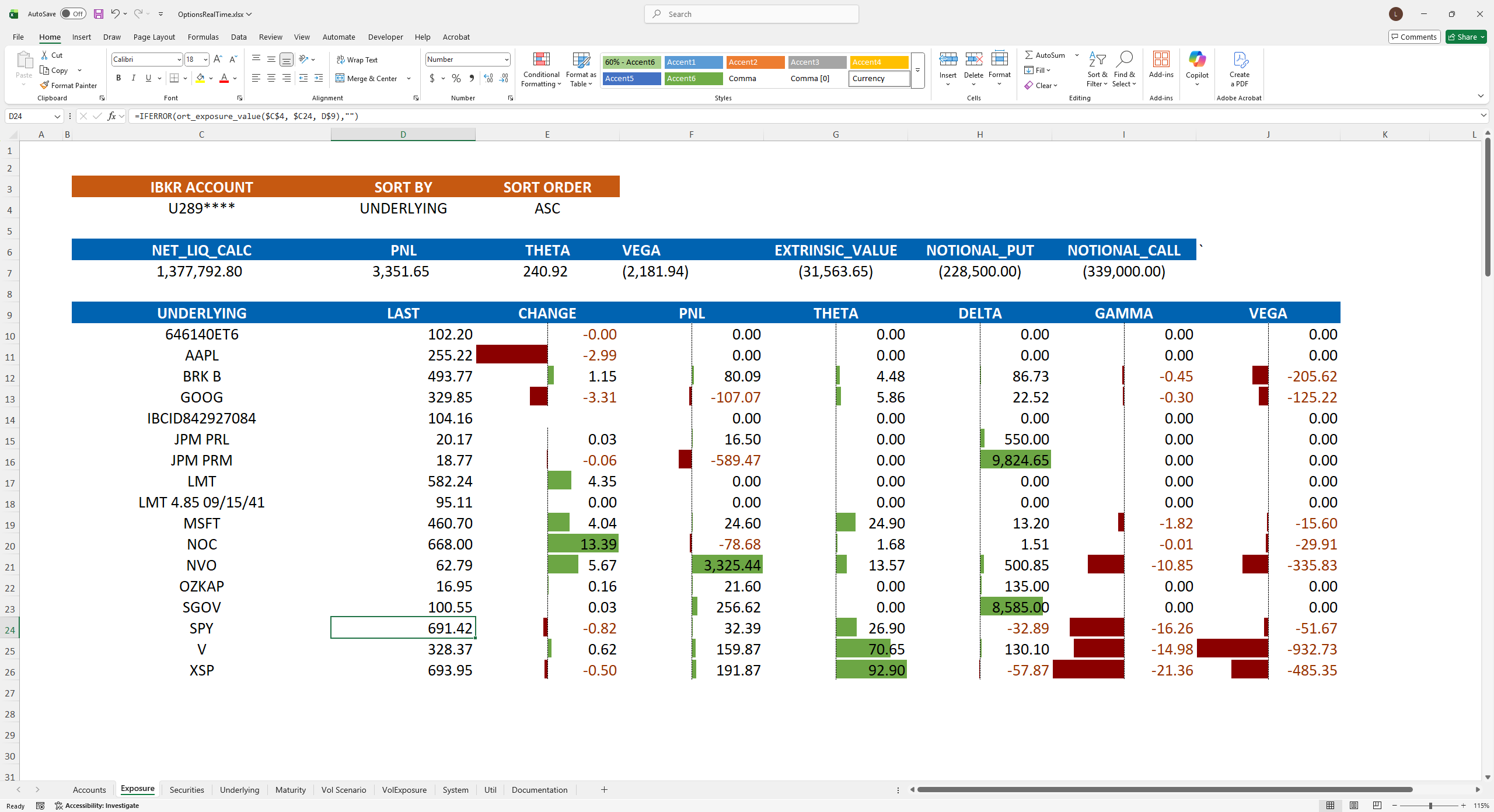
Exposure: Underlying-level aggregated data
-
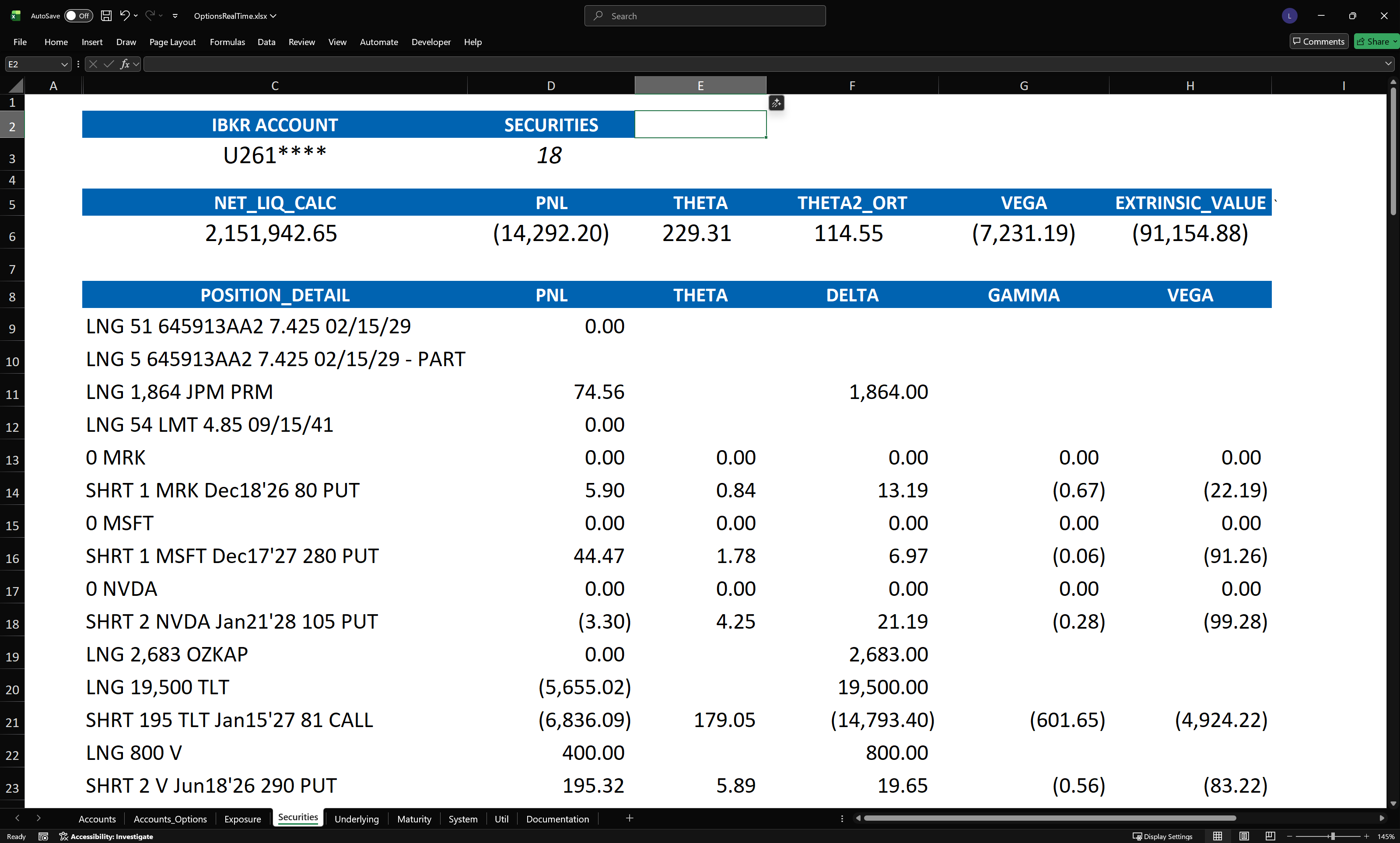
Securities: Per-position detail
-
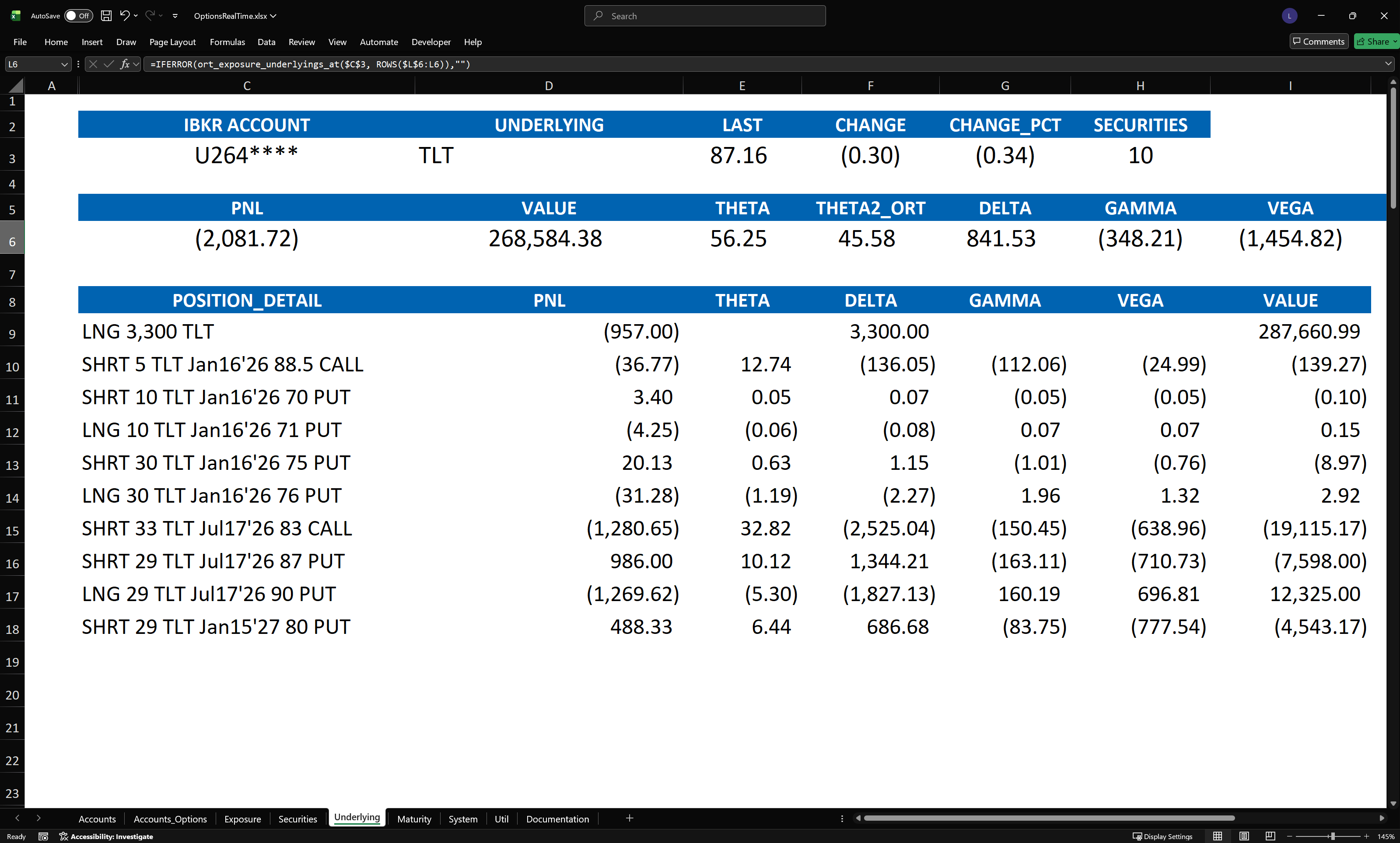
Underlying: Drill-down by underlying symbol
-
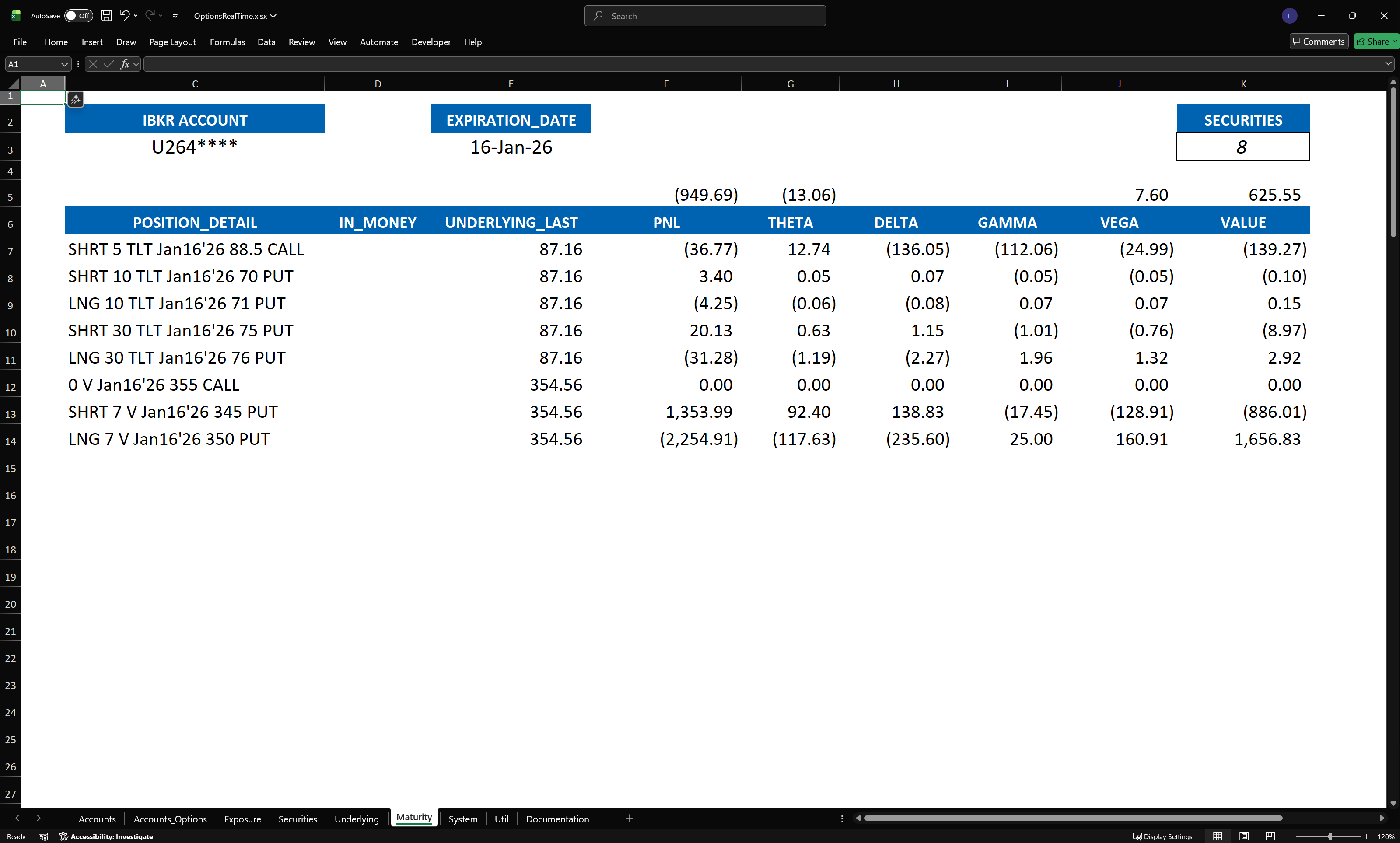
Maturity: Positions grouped by expiration
-
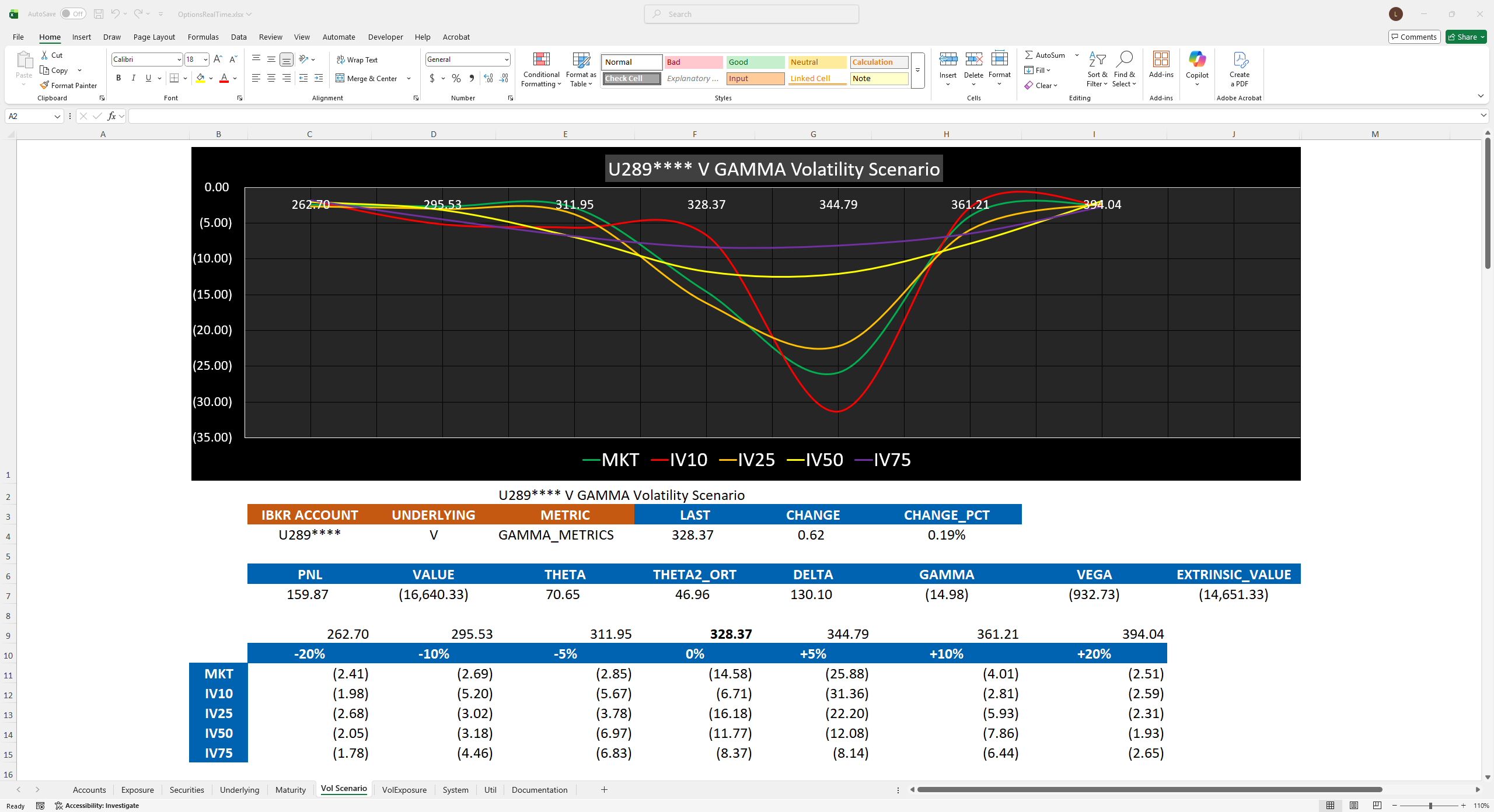
Vol Scenario: Position risk metrics across volatility scenarios
-
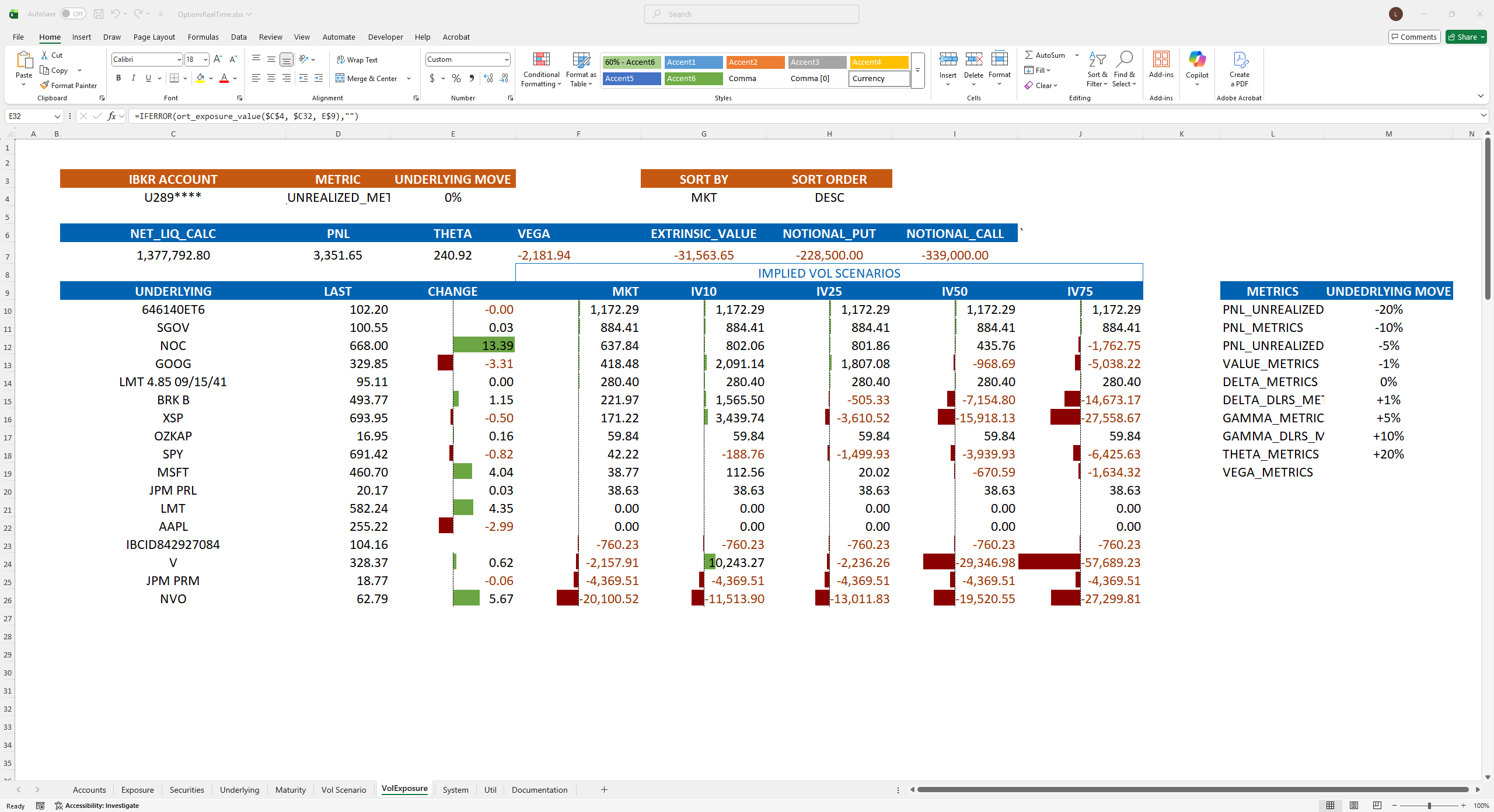
Vol Exposure: Underlying risk metrics across volatility scenarios
-
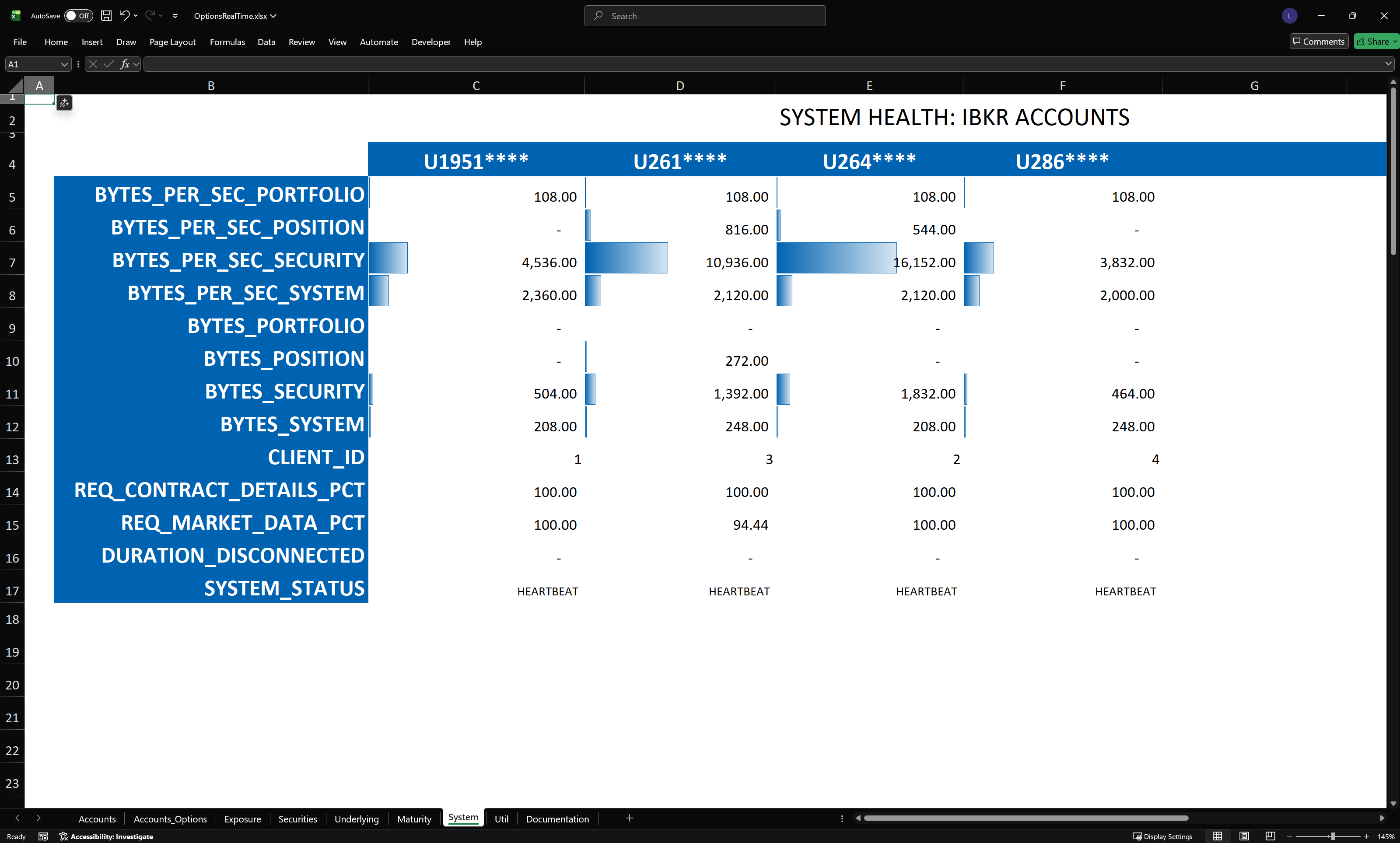
System: Connection health and diagnostics
-
Util: Helper functions and configuration
-
Documentation: Quick reference
Examples
Section titled “Examples”All examples allow user to select any account:
Aggregated Greeks and PnL by underlying
Detailed position view
View of positions for a single underlying
View of positions at a selected expiration
Underlying metrics across price and IV scenarios
Metrics across IV and price scenarios for a single aggregated underlying
System health and data throughput
Note that no Visual Basic for Applications (VBA) is required — this is a pure .xlsx workbook consisting mostly of simple Real Time Data (RTD) formulas. No macros, no security warnings, no code to maintain.