
Quotes
The Quotes panel contains tiles of aggregated metrics for each underlying present in the portfolio. Like the Portfolio Metrics container, individual tiles are grouped in a flow container. As the panel is resized, quote tiles wrap and reflow within the container, each maintaining uniform width and height. Tiles can be reordered and the grouping will be saved. When dragging a tile, white borders appear around surrounding tiles indicating where the selected tile will be inserted.
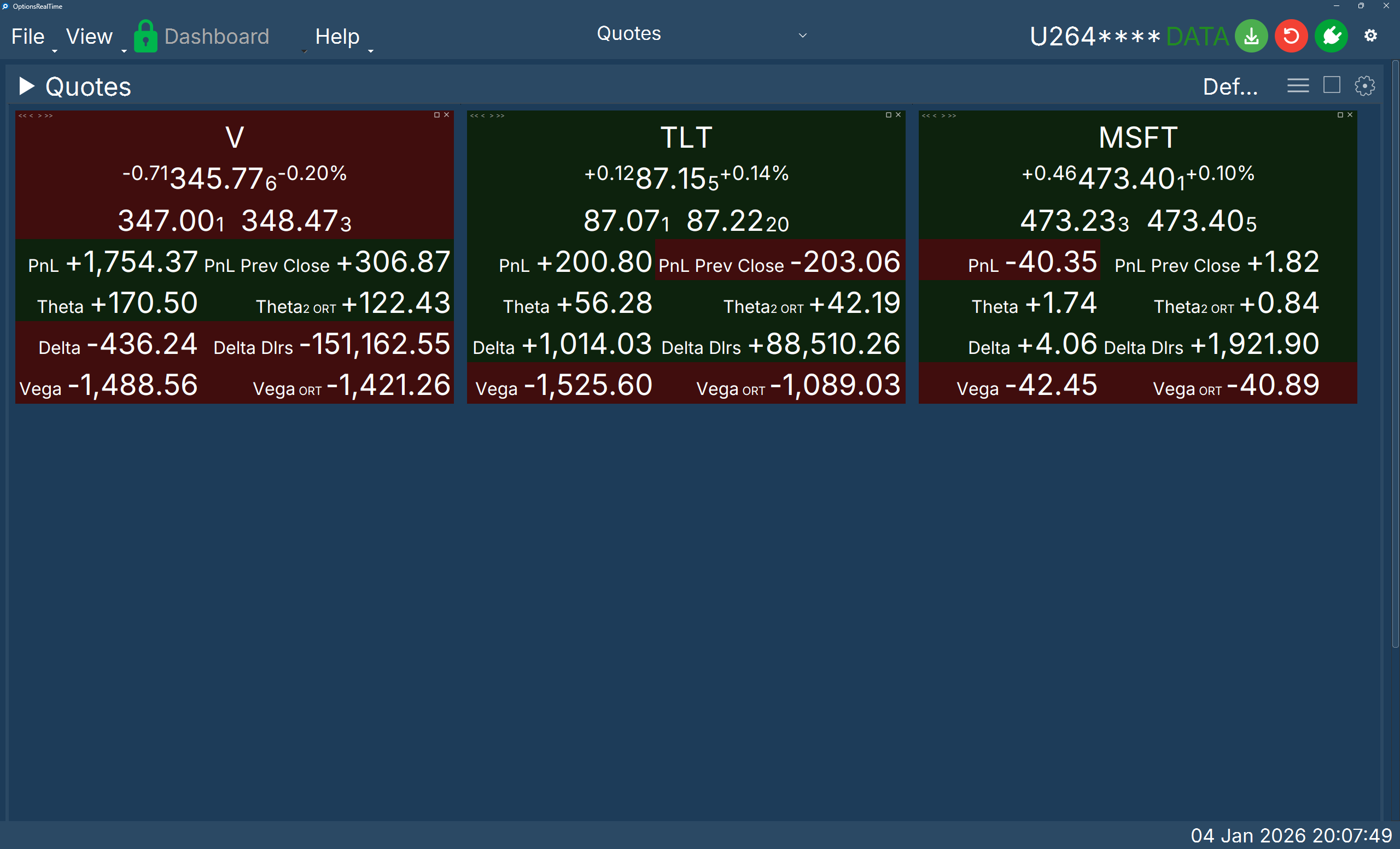
Display Settings
Section titled “Display Settings”- Label Font Size: Controlled by the Dashboard’s Titlebar Font Size setting, which applies to all panel labels
- Label Font Style: Controlled by the Dashboard’s Font setting, which applies to all panels
- Label Italics: Labels can be italicized via Dashboard settings
- Value Font Size: Controlled via the settings gear icon in the right corner
- Value Background Color: Displays positive, negative, or flat Data Colors from Dashboard settings (when applicable to that metric in the tile)
- Border Thickness: Controlled via the settings gear icon in the right corner
Container Controls
Section titled “Container Controls”Each tile in the container has controls in the upper corners.
Left Corner (Reorder)
Section titled “Left Corner (Reorder)”- <<: Move tile to front of container
- <: Move tile left
- >: Move tile right
- >>: Move tile to end of container
Right Corner
Section titled “Right Corner”- ⓘ: Underlying Summary — hover to display a live popup of aggregate metrics for the underlying (see below)
- +: Super Maximize / Restore — toggles tile to fill the entire Dashboard or restore to original size
- ☐: Maximize / Restore — toggles tile to fill its panel or restore to original size
- ✕: Hide the tile
Underlying Summary Popup
Section titled “Underlying Summary Popup”Hovering over the ⓘ icon displays a live popup showing aggregate exposure metrics for that underlying. Values update in real time as market data ticks in — the popup is not a snapshot but a continuously refreshing view.
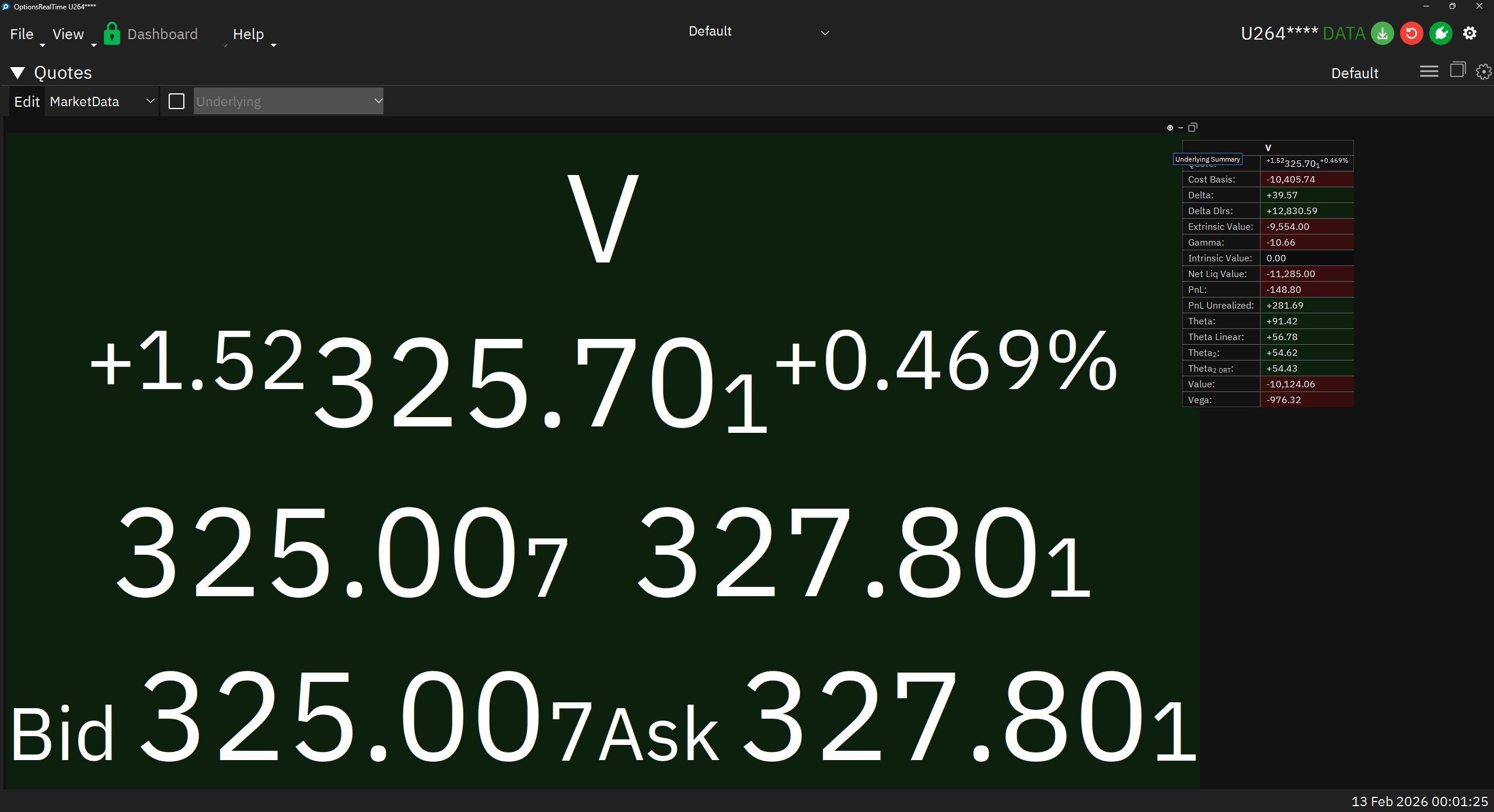
The popup includes the underlying’s quote (bid, ask, last, change) and a configurable set of aggregate fields such as Delta, Delta $, Theta, Vega, Gamma, Cost Basis, PnL, Value, Intrinsic/Extrinsic Value, and more. All values are summed across every position (options and stock) for that underlying, matching the Exposure table.
Customizing Popup Fields
Section titled “Customizing Popup Fields”The fields displayed in the popup are configurable per saved perspective. To customize, add an infoPopupFields array to the quote perspective’s JSON file, listing the desired Field IDs by name. For example:
{ "infoPopupFields": [ "COST_BASIS", "DELTA", "DELTA_DLRS", "EXTRINSIC_VALUE", "GAMMA", "INTRINSIC_VALUE", "NET_LIQ_VALUE", "PNL", "PNL_UNREALIZED", "THETA", "THETA2_ORT", "THETA_LINEAR", "VALUE", "VEGA" ]}Only fields belonging to the Exposure table are valid. Unrecognized or invalid field names are silently skipped. If the key is absent, a default set of fields is used. See the Field Reference for the complete list of available Field IDs.
Control Panel
Section titled “Control Panel”In the upper left corner of the Quotes panel, next to its label, is a chevron which can be clicked to toggle the visibility of an additional control panel. The control panel contains:
- A button labeled Edit which opens the quote layout customization panel
- A listbox of saved custom quote layouts
- A checkbox to toggle selection of all underlyings
- A listbox of selectable underlyings
Custom Quote Layouts
Section titled “Custom Quote Layouts”The quote layout panel is used to create, modify, and delete custom quote layouts. Tiles within the Quotes container are rendered using the selected quote layout, allowing different views of underlying aggregate metrics that can be switched at will.
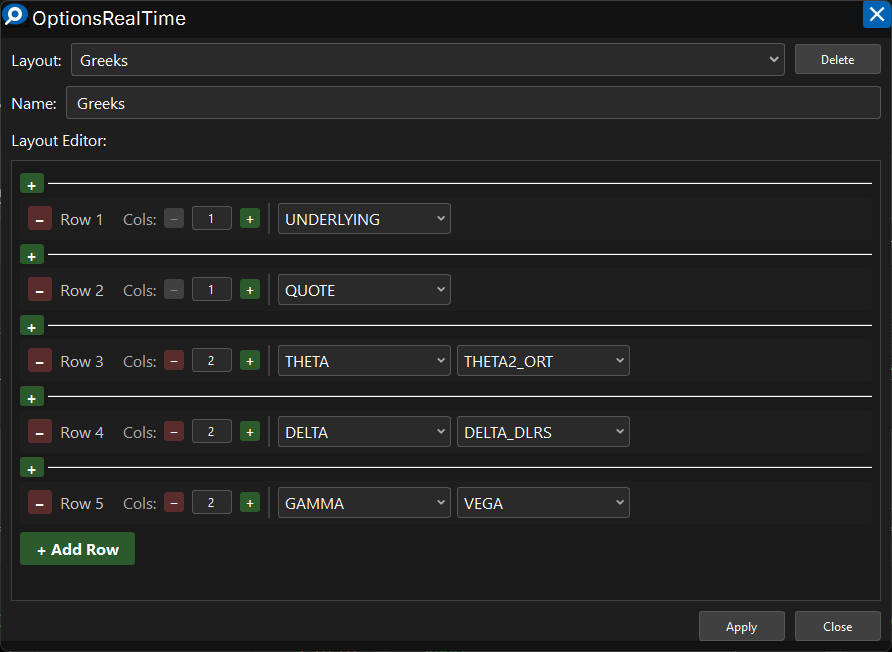
Enter a new name in the Name field to create a new layout from an existing layout. The dialog allows inserting or deleting rows, specifying columns per row, and selecting from available portfolio metrics. Choose Apply at the bottom to immediately see the layout in action.
Mouse Controls
Section titled “Mouse Controls”- Left-click drag: Drag tile to rearrange within the container
- Mouse Wheel: Scroll tiles vertically within the container
- Ctrl+Shift+Mouse Wheel: Zoom tiles in and out